
Are Stronger Google Reviews Sending Patients to Your Competitors?
Every month, prospective patients search Google for a doctor, medical office, or healthcare provider. They often compare ratings, reviews, and responses before choosing whom to call.
If a nearby competitor has a stronger Google rating, your practice could be losing new patients—even when you provide excellent care.
Use the Lost Patient Revenue Calculator to estimate how much monthly revenue may be affected by the difference between your rating and a competitor’s rating.
Estimated 46 patients lost each month.
Why Google Reviews Matter to Your Practice
Patients cannot always judge the quality of medical care before scheduling an appointment. Instead, they look for signs that help them feel confident about their decision.
Those signs often include:
- How your rating compares with nearby competitors
- Your overall Google rating
- The number of reviews you have
- How recently patients left reviews
- How your practice responds to feedback
A practice with a 4.8-star rating may appear more trustworthy than a practice with a 3.8-star rating—even if both practices provide excellent care.
That difference can affect phone calls, appointment requests, website visits, and new-patient revenue.
| Calculator input | What to enter | Why it matters |
|---|---|---|
| New Patients Per Month | Enter the number of new patients your practice currently sees or could reasonably serve during an average month. | Determines the size of your potential patient opportunity. |
| Average Patient Value | Enter the estimated revenue generated by one new patient. Include appointments, follow-up visits, treatments, tests, and other services. | Converts potential patient gains or losses into estimated revenue. |
| Your Google Review Rating | Enter the current rating displayed on your Google Business Profile. | Establishes your practice’s current position. |
| Competitor Rating | Find a nearby doctor or medical practice offering similar services and enter its Google rating. | Provides a realistic local comparison. |
What the calculator estimates:
The calculator compares your rating with your competitor’s rating to estimate how many prospective patients may choose the higher-rated practice—and the potential revenue impact.

Why Is This Calculator Important?
A small rating difference may not look serious, but its financial effect can add up.
If your practice loses only a few prospective patients each week, that could represent thousands of dollars in missed monthly revenue. The long-term value may be even higher when new patients return for follow-up care or refer family members.
The calculator helps turn a review-rating difference into a number that is easier to understand.
Instead of only seeing that a competitor has a higher rating, you can estimate what that difference may mean for your practice.

Who Can Get Value From This Calculator?
This calculator can help:
- Solo physicians
- Medical practices with multiple providers
- Dentists and dental offices
- Chiropractors
- Podiatrists
- Pediatricians
- Dermatologists
- Physical therapy practices
- Urgent care centers
- Mental health providers
- Home healthcare agencies
- Nursing homes and assisted-living facilities
- Practice managers and medical-office administrators
- Healthcare marketing teams
Any healthcare organization that depends on new patients, inquiries, tours, appointments, or admissions can use this calculator.
How Doctors Can Evaluate Their Own Practice
| Step | What to do | What to check |
|---|---|---|
| 1. Check Your Google Business Profile | Search Google for your medical practice. | Record your rating and total reviews. Confirm your address, phone number, hours, services, and website link are correct. |
| 2. Find Your Closest Competitors | Search for the same medical service in your area, such as “Brooklyn pediatrician” or “foot doctor in Queens.” | Identify the practices appearing near the top of Google Maps. |
| 3. Compare Your Online Reputation | Compare your practice with one or two leading competitors. | Check their rating, number of reviews, recent reviews, owner responses, and overall online activity. |
| 4. Use the Calculator | Enter your monthly new-patient volume, average patient value, Google rating, and a competitor’s rating. | Review the estimated monthly patient revenue that may be at risk. |
| 5. Test Different Ratings | Increase your rating in the calculator to explore different scenarios. | Compare improvements such as 3.8 → 4.0, 4.0 → 4.3, 4.3 → 4.6, or 4.6 → 4.8 stars. |
Goal: Use the results to establish a realistic Google review-management target for your medical practice.

How to Use the Results
Your result should be used as a planning estimate—not a guarantee.
It can help your practice:
- Understand the possible cost of a weak review profile
- Set a goal for improving its Google rating
- Compare its online reputation with local competitors
- Decide whether review management should be a priority
- Estimate the value of earning more patient reviews
- Explain the business impact to owners or administrators
- Track progress over time
The calculator can also help practice managers show why Google reviews should be treated as part of patient acquisition—not simply as online comments.

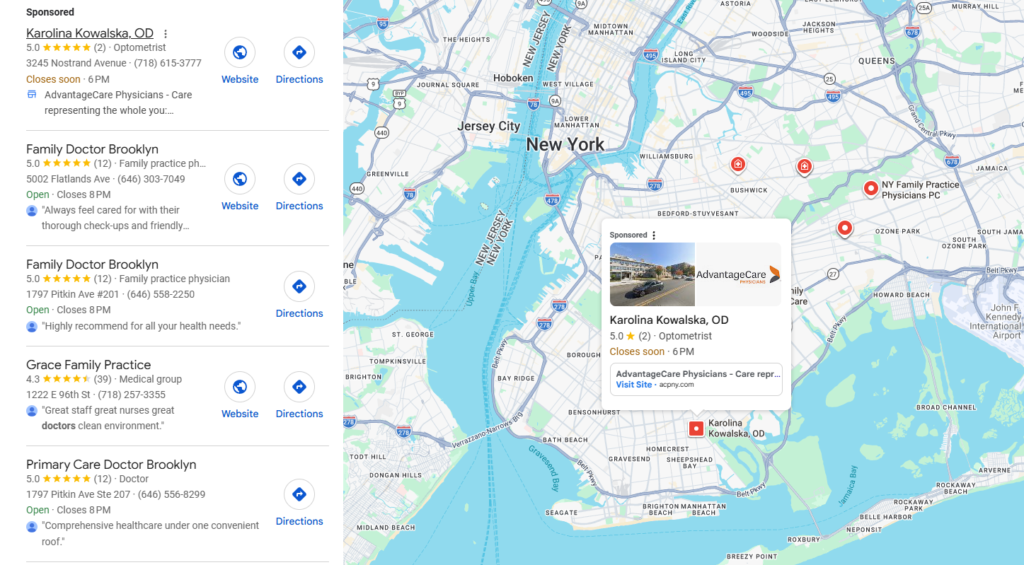
Your Rating Is Only Part of the Picture
A strong Google rating can help, but patients may also consider:
- Total review count
- Recent review activity
- Detailed patient experiences
- Professional responses from the practice
- Google Maps visibility
- Distance from the patient
- Insurance accepted
- Appointment availability
- Website quality
- Ease of contacting the office
For a better understanding of your position, compare your complete Google Business Profile with several nearby competitors.


What Should You Do If Competitors Have Stronger Reviews?
Start with a consistent and ethical review-management process.
Your practice can:
- Ask patients for honest feedback
- Make the review process easy
- Send requests at the right time
- Train employees on how to request reviews
- Monitor new reviews
- Respond professionally
- Protect patient privacy when responding
- Avoid offering rewards for positive reviews
- Never purchase or create fake reviews
Healthcare providers should also avoid confirming that a reviewer is a patient or sharing protected health information in a public response.
Find Out How Your Practice Compares
A better Google review profile can help your practice build trust, earn more calls, and compete for new patients in your local area.
Lookhin4 helps physicians, medical practices, nursing homes, and other healthcare providers monitor reviews, request honest feedback, respond professionally, and strengthen their local reputation.
See how your practice compares with nearby competitors and discover where you may be losing visibility, trust, and new-patient opportunities.

Disclaimer: This calculator provides an estimate for marketing and business-planning purposes. It does not guarantee patient volume, revenue, or specific results. Actual outcomes depend on several factors, including location, competition, insurance participation, services, availability, review volume, and patient behavior.