
Table of Contents
Writing a review on Google is a great way to share your experience with a business.
Reviews help other customers decide where to shop, eat, or hire services. Many people check reviews before choosing a business on Google.
Leaving a review only takes a few minutes and can help businesses improve their service.
Let’s walk through how to do it.
⭐ Why Google Reviews Matter
Google reviews help both customers and businesses.
Reviews allow people to:
- Share their experiences
- Recommend good businesses
- Warn others about problems
For businesses, reviews can:
- Build trust with new customers
- Improve local search rankings
- Increase website traffic and visits
This is why businesses encourage customers to leave feedback through Google Business Profile.
📌 Step 1: Sign in to Your Google Account
Before writing a review, you must sign in to your Google account.
If you don’t have one, you can create a free account at:
Once logged in, you can leave reviews for any business listed on Google.
📌 Step 2: Search for the Business
Use Google search or Google Maps to find the business.
Steps:
- Open Google or Google Maps
- Type the business name in the search bar
- Select the correct listing
You will see the business profile with ratings and customer reviews.
📌 Step 3: Click “Write a Review”
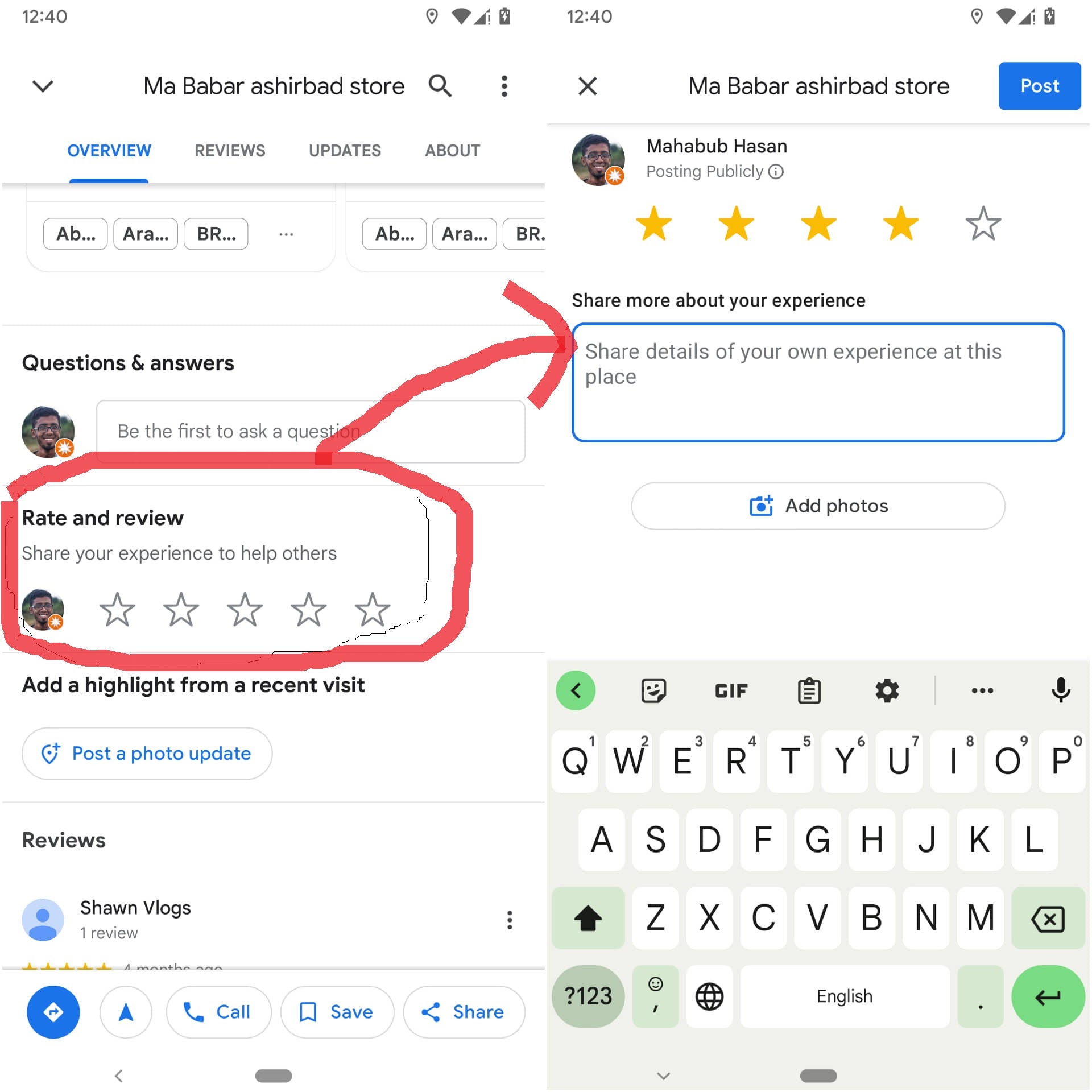
Scroll to the reviews section.
Look for the button that says “Write a Review.”
Tap or click the button to open the review form.
📌 Step 4: Choose a Star Rating
Google uses a 1–5 star rating system.
⭐ 5 stars – Excellent
⭐ 4 stars – Very good
⭐ 3 stars – Average
⭐ 2 stars – Poor
⭐ 1 star – Very bad
Choose the number of stars that matches your experience.
📌 Step 5: Write Your Review
After selecting a star rating, you can write a short message describing your experience.
Good reviews often include:
- The service you received
- What you liked about the business
- Whether you would recommend it
Example review:
“Great service and friendly staff. They completed the job quickly and explained everything clearly. Highly recommend.”
You can also upload photos if you want.

📌 Tips for Writing a Helpful Review
Helpful reviews usually include:
- Honest feedback
- Clear details about the experience
- Respectful language
Avoid:
- Offensive language
- Fake reviews
- Personal attacks
Google has guidelines to keep reviews fair and helpful.
You can read them here:
📊 Where Your Review Appears
After submitting your review, it will appear on the business profile.
Customers searching for businesses in places like New York City can see your review when they view the listing.
Your feedback may help someone decide which business to choose.
❓ Frequently Asked Questions
Do I need a Google account to leave a review?
Yes. You must be signed into a Google account.
Can I edit my review later?
Yes. You can update or delete your review anytime.
Are Google reviews free?
Yes. Writing and reading reviews is completely free.
Can businesses delete my review?
No. Businesses cannot remove reviews unless they violate Google policies.
Can I add photos to my review?
Yes. Photos help other customers see the business experience.
How long does it take for a review to appear?
Most reviews appear immediately, but sometimes moderation may delay them.
🎯 Final Thoughts
Learning how to write a review on Google is quick and easy.
All you need to do is search for the business, click Write a Review, choose a star rating, and share your experience.
Your review helps other customers make better choices and helps businesses improve their service.
Related Articles
How to Get 4.9 on Google Reviews: The Smart Strategy Local Businesses Use
Why Are My Google Reviews Not Showing Publicly? Easy Fix Guide
Why Google Reviews Are the New Word-of-Mouth for Accounting Firms
Latest Articles
-
Google Review Removal Service That Protects Your Reputation and Builds Trust
Can Negative Google Reviews Damage a Healthcare Organization? A sudden wave of negative Google reviews can seriously damage the reputation of a nursing home or medical practice. Families researching nursing homes often compare ratings, recent reviews, management responses, photographs, and overall review activity before scheduling a tour. Patients may perform the same research before choosing…
-
Google Review Management Agency That Helps Businesses Build Trust and Get More Customers
People trust Google reviews before they trust advertisements. Before contacting your business, potential customers usually search your company online and ask themselves one important question: “Can I trust this business?” That answer often comes from your reviews. Customers look at: If your business has weak reviews, outdated feedback, or unanswered complaints, customers may choose a…
-
How to Get New Patients in New York With Google Reviews
Your next patient in New York may decide whether to call your practice before ever speaking to your staff. Today, patients search, compare, and read reviews before choosing care. A 2025 survey found 84% of patients check online reviews before choosing a new healthcare provider. In 2026, 75% said they wouldn’t book with a provider…
-
How Accepted Insurance Plans Can Strengthen Medical Local SEO
When patients search for a doctor, they are not only looking for the right specialty or the closest medical office. Many also need to know whether the practice accepts their insurance. A patient might search Google for: If your website does not clearly list the insurance plans your practice accepts, Google and potential patients may…
-
Brooklyn Nursing Home Marketing in 2026: How to Turn Google Searches Into More Admissions
If you’re responsible for marketing or admissions at a nursing home, you already know how to generate business the traditional way. You know the importance of hospital relationships. You know your discharge planners, case managers, physicians, community partners, and referral sources. You know what happens to census when those relationships are strong, and you know…
-
Google Reviews and Search Console: Drive More Traffic to Your Queens Medical Practice
Google Reviews and Search Console: Drive More Traffic to Your Queens Medical Practice A patient in Queens searches Google for a family doctor, chiropractor, dentist, physical therapist, podiatrist, urgent care center, or medical specialist. Within seconds, that patient may see several practices competing for attention. The listings can look similar, but the patient still has…