


Many business owners ask the same question:
“How to get 4.9 on Google reviews?”
A high rating like 4.9 stars shows customers that your business delivers excellent service. When people search for businesses online, the star rating often decides where they spend their money.
Most customers check reviews on Google before calling or visiting a business.
If your rating is close to 5 stars, customers are more likely to trust you.
Let’s explore how businesses achieve a 4.9 rating.
⭐ Why a 4.9 Rating Matters

A high rating can help your business:
- Build trust with new customers
- Increase phone calls and bookings
- Improve local search rankings
- Stand out from competitors
Most people choose businesses with 4.5 stars or higher.
A 4.9 rating puts you near the top of your industry.
📌 1. Deliver Excellent Customer Service
The best way to earn great reviews is simple:
Give customers a great experience.
Focus on:
- Friendly service
- Quick responses
- Professional work
- Clear communication
Happy customers naturally leave positive feedback.
📌 2. Ask for Reviews From Happy Customers
Many customers will leave a review if you ask.
The best time to ask is right after a successful service.
Example script:
“Thanks for choosing us today. If you have a moment, we’d really appreciate a quick Google review.”
Using your Google Business Profile, you can send customers a direct review link.
This makes the process very easy.
📌 3. Fix Problems Before Customers Leave Reviews
Sometimes customers are unhappy but never say anything.
Encourage feedback before they leave.
Ask questions like:
- “Was everything okay today?”
- “Is there anything we can improve?”
Fixing problems quickly prevents negative reviews.
📌 4. Respond to Every Review
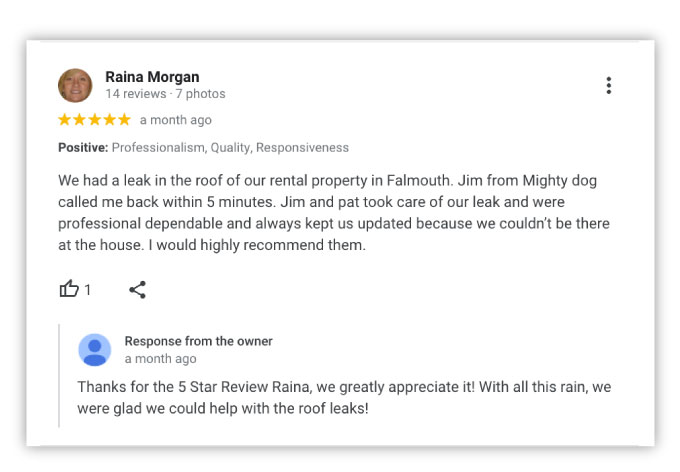
Responding to reviews shows customers that you care.
Example response:
“Thank you for your kind review. We’re glad you had a great experience.”
For negative reviews, respond calmly and offer help.
This can improve your reputation.
📌 5. Make Reviews Easy to Leave
The easier the process is, the more reviews you’ll receive.
Ways to simplify reviews:
- Send a review link by text or email
- Add review links to receipts
- Use QR codes at your business
Customers can scan a code and leave a review in seconds.
📌 6. Encourage Detailed Reviews
Detailed reviews help build trust.
Encourage customers to mention:
- The service they received
- The staff member who helped them
- Their overall experience
These reviews look more authentic.
📌 7. Avoid Fake Reviews
Fake reviews can harm your business.
Google may remove suspicious reviews or penalize listings.
Always request honest feedback from real customers.
You can read more about Google review policies here:
https://support.google.com/business/
📌 8. Maintain Consistent Service Quality

A 4.9 rating requires consistency.
Every customer interaction matters.
Focus on:
- Staff training
- Quality control
- Fast response times
Consistency keeps your ratings high.
📊 What Does a 4.9 Rating Look Like?
Typical example:
- 100 reviews
- 95 five-star reviews
- 4 four-star reviews
- 1 three-star review
The average rating stays close to 4.9 stars.
Even excellent businesses occasionally receive lower ratings.
What matters most is overall consistency.
❓ Frequently Asked Questions
Is a 4.9 rating realistic?
Yes. Many businesses maintain ratings between 4.7 and 4.9.
How many reviews do I need?
Businesses with 50–200 reviews often build strong credibility.
Can negative reviews be removed?
Only if they violate Google’s policies.
Should I ask every customer for reviews?
Yes, but only ask politely.
Do reviews affect local search rankings?
Yes. Reviews are an important local ranking factor.
How often should I respond to reviews?
Try to respond within 24–48 hours.
🎯 Final Thoughts
If you’re wondering how to get 4.9 on Google reviews, the strategy is simple.
Deliver great service.
Ask satisfied customers for feedback.
Respond to reviews professionally.
Maintain consistent quality.
Over time, these steps will help you build a strong reputation and attract more customers online.
Related Articles
Why Google Reviews Are the New Word-of-Mouth for Accounting Firms
Boost your Small Business: How to get more google reviews
How to Increase Google Reviews Organically (Proven 2026 Strategy)
Latest Articles
-

Google Review Removal Service That Protects Your Reputation and Builds Trust
-

Google Review Management Agency That Helps Businesses Build Trust and Get More Customers
-

How to Get New Patients in New York With Google Reviews
-

How Accepted Insurance Plans Can Strengthen Medical Local SEO






