Hey there! I’m a web designer and SEO consultant, and I’m about to share something that consistently helps me and my clients climb the rankings—my Search Engine Optimization Guaranteed Checklist. By the end of this guide, you’ll know exactly how to optimize your site with confidence and start seeing real results in search visibility. Let’s get into it!
1. Start with a Smart Page Title
Your page title is like your book cover—it’s the first thing people and search engines see.
Checklist:
- Keep it under 60 characters ✅
- Put your main keyword at the front ✅
- Make it click-worthy with power words (like “Best,” “Easy,” “Proven”) ✅
Example: “Guaranteed On-Page SEO Checklist for Higher Rankings
2. Write a Compelling Meta Description
Think of this like your ad for Google! It doesn’t directly affect rankings, but it sure boosts clicks.
Checklist:
Make it exciting! ✅
Keep it under 155 characters ✅
Include your main keyword ✅
3. Use One H1 Heading Per Page
Your H1 is your page’s headline. Google reads it first to understand your topic.
Checklist:
Make it friendly and helpful ✅
Use your focus keyword ✅
Don’t use more than one H1 ✅
Eleanor Harris (American, 1901-1942)

4. Short, Sweet URLs with Keywords
URLs should be easy to read and tell search engines (and people!) what the page is about.
Checklist:
Add your main keyword ✅
Use dashes (not underscores) ✅
Keep them short ✅
5. Optimize Your First 100 Words
Search engines check the top of your content to understand the topic fast.
Checklist:
Be natural, not robotic ✅
Add your keyword early ✅
Use a hook to grab attention ✅
Eleanor Harris (American, 1901-1942)

6. Use Headings (H2, H3) to Organize Content
Headings break things up and make your page easier to read.
Checklist:
- Use subheadings every 100–200 words ✅
- Include semantic keywords in them ✅
- Use proper hierarchy (H2 > H3) ✅
7. Use Internal Links!
Help search engines explore your site—and help users too!
Checklist:
- Link to 2–5 other pages ✅
- Use helpful anchor text ✅
- Keep it relevant ✅
8. Add Outbound Links to Authority Sites
Don’t be afraid to link to trusted resources. It shows you know your stuff!
Checklist:
- Link to 1–2 reputable sources ✅
- Keep links recent and useful ✅
- Open in a new tab ✅
9. Sprinkle in Synonyms and Related Keywords
Google is smart—it understands related terms. Use them!
Checklist:
- Use tools like LSIGraph or ChatGPT ✅
- Write naturally ✅
- Don’t keyword stuff ✅
10. Use Images (With Alt Text!)
Images keep people engaged. But they also help with SEO if you add alt text.
Checklist:
- Add at least 1 image ✅
- Use the keyword in the alt tag ✅
- Compress images for fast loading ✅
11. Make It Mobile Friendly
Google is mobile-first! If your site isn’t friendly on phones, rankings drop fast.
Checklist:
- Use responsive design ✅
- Test on real phones ✅
- Avoid tiny buttons and text ✅
12. Boost Page Speed
Fast sites = happy users + better rankings!
Checklist:
- Compress images ✅
- Use caching ✅
- Avoid heavy scripts ✅
13. Use Schema Markup
This tells Google more about your page—like recipes, reviews, FAQs, and more.
Checklist:
- Use JSON-LD format ✅
- Add relevant schema ✅
- Test with Google’s Rich Results tool ✅
14. Include a Clear Call to Action (CTA)
Don’t forget to tell visitors what to do next!
Checklist:
- Add a CTA in the intro ✅
- Use another one near the end ✅
- Make it visible and direct ✅
15. Check for Duplicate Content
Google hates when it sees the same content twice. Keep it original!
Checklist:
- Use Copyscape or Grammarly ✅
- Rewrite any repeated text ✅
- Focus on your unique angle ✅
16. Make Your Content Long and Helpful
Google loves content that goes deep and solves problems.
Checklist:
- Write at least 1,500 words ✅
- Use bullet points and short paragraphs ✅
- Answer questions people ask ✅
17. Add FAQs (Like This One!)
FAQs help with voice search and rich snippets. Boom!
Checklist:
- Add 3–5 real questions ✅
- Answer in a friendly tone ✅
- Use structured FAQ schema ✅
18. Update Old Content Regularly
Old pages can drop in rankings if they go stale. Keep them fresh!
Checklist:
- Add new stats and info ✅
- Fix broken links ✅
- Update every 6–12 months ✅
19. Use a Table of Contents
Especially helpful for long content (like this!).
Checklist:
- Use jump links ✅
- Keep it at the top ✅
- Make it clickable ✅
20. End with a Strong Conclusion
Wrap things up in a way that encourages action.
Checklist:
- Summarize key points ✅
- Add your final CTA ✅
- Keep the energy up ✅
How To Optimize for Search Intent
- Boost rankings big time.
- Turn visitors into real customers instead of just drive-by clicks.
But if we miss the mark?
Even the best-written page could end up falling flat.
You and I both know SEO isn’t just about stuffing keywords into a page and crossing our fingers that Google notices.
Sure, that might have worked years ago — but not anymore.
Today, it’s about understanding what people actually want when they type something into that search bar.
That’s what we call search intent.
And let me tell you, when you and I nail search intent, we can:
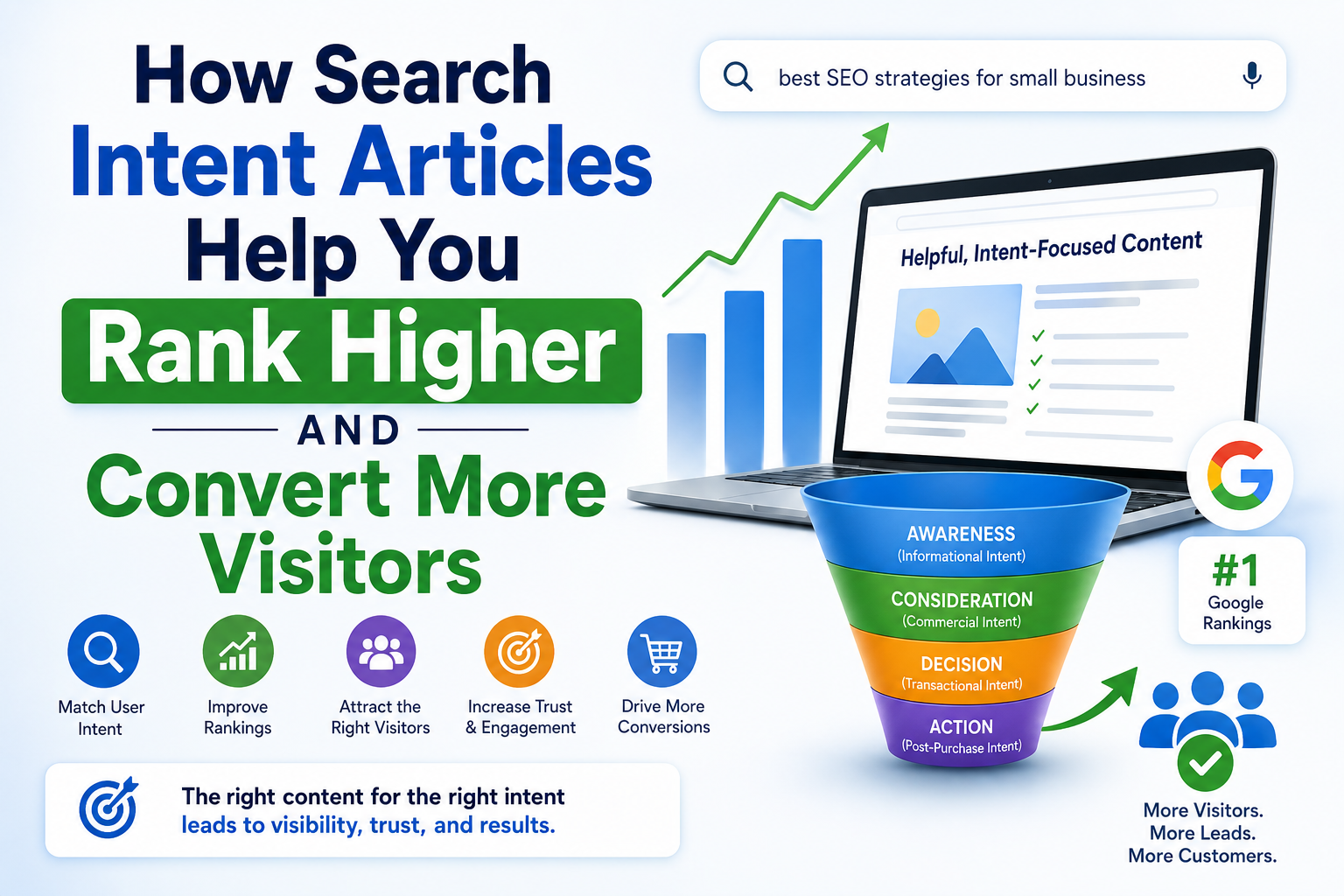
Think about it. When someone types something into Google, they’re looking for something specific. They might want an answer (informational), a product (transactional), or to compare options (navigational). If your page nails that need? Boom 💥—you win clicks, time-on-page, AND trust.
Why Search Intent Is Everything in SEO
Imagine someone Googles “best beginner yoga poses.” If your page is trying to sell them yoga mats right away, they’re gone in seconds. But if you give them a friendly list of easy poses, you’ve nailed their intent. That’s search engine optimization working exactly how it should!

Google’s goal is to give people the most helpful results. So the better your content fits search intent, the more likely you’ll:
- Show up higher in search results 🚀
- Keep people on your site longer ⏳
- Get more clicks, shares, and conversions 💰
I’ve seen this again and again as a web designer and SEO consultant—matching content to intent is one of the most reliable ways to boost results.

Different Types of Search Intent (And How to Target Them)
Let’s break it down into the 4 main types of search intent. Knowing these helps you adjust your search engine optimization strategy for every page:
1. Informational Intent
People want answers or knowledge. Think: “how to bake banana bread” or “what is on-page SEO?”
Your goal:
- Create content that educates and answers clearly.
- Use headings, lists, and visuals to help users learn fast.
2. Navigational Intent
They’re looking for a specific website, brand, or tool. Like: “Yoast SEO plugin” or “Facebook login.”
Your goal:
- Make sure your brand pages are well-optimized with your name and services.
- Use internal links to guide users where they want to go.
3. Transactional Intent
Now we’re talking money! These users are ready to buy. They search things like: “buy ergonomic office chair” or “best web hosting 2025.”
Your goal:
- Use strong CTAs, trust signals, and product details.
- Don’t forget schema markup and killer page speed!
4. Commercial Investigation
They’re doing research before making a decision. Example: “Elementor vs Divi” or “top SEO tools compared.”
Your goal:
- Offer honest comparisons.
- Use tables, pros/cons, and expert insights.

How I Use Search Intent in My Client SEO Strategy
As someone knee-deep in search engine optimization every day, I always start with this question: What is the user really hoping to find?
Once I know that, I:
- Adjust the headline to match their intent 🎯
- Use language and tone they expect
- Structure the page to guide them smoothly
One time, a client had a blog post ranking for “free productivity tips,” but it led users straight into a software sales pitch. Yikes! I rewrote the post to offer 10 solid, free tips first—then introduced the tool as a bonus at the end. Guess what? Rankings and conversions jumped. That’s how powerful matching intent can be!
Search Intent + SEO = Ranking Magic
If you’re doing search engine optimization and ignoring search intent, it’s like baking a cake without knowing what kind it is. Sure, you might make something tasty—but it’s not what the person wanted!
When you align your pages with intent, you naturally use keywords the way search engines love. You also:
- Improve user experience
- Reduce bounce rates
- Increase time on site
- Build trust and authority
All of that boosts your overall search engine optimization success!
Conclusion
If you’ve made it this far—awesome! 🎉 That means you’re serious about leveling up your on-page SEO game. Whether you’re tweaking title tags, speeding up your pages, or nailing search intent, every step in this checklist works together to make your site stronger, faster, and way more visible.
As a web designer and SEO consultant, I’ve seen firsthand how small changes can lead to big wins. So don’t feel like you have to do it all at once. Start with the basics, stay consistent, and keep your users in mind. That’s the real secret to search engine optimization that actually works!
Need more guidance? I highly recommend checking out Google’s official SEO starter guide for best practices straight from the source. You can also dive deeper into keyword strategies with Moz’s Beginner’s Guide to SEO, one of my all-time favorite resources.
FAQs
Q1: How long does it take to see results from on-page SEO?
It depends! You can see changes in 2–6 weeks, especially if your site already has some authority.
Q2: Do I need to use all 20 steps?
You don’t have to, but the more you check off, the better your results will be!
Q3: Can I do on-page SEO without plugins or tools?
Yes! But tools like Yoast, RankMath, or SEOptimer make it way easier.
Q4: What’s the biggest mistake people make with on-page SEO?
They forget about the user! Always write for people first, then optimize for search engines.
Q5: Should I hire someone or do this myself?
If you’ve got the time, do it yourself! If not, hire someone like me
Related Articles
Chicago SEO Tips: How To Rank #1
How to Write SEO Titles That Boost Click-Through Rates (CTR)