


- Why Your Business Needs a Website (Even If You’re on Social Media)
- Step 1: Choose a Free AI Website Builder
- Step 2: Let AI Generate Your Website Structure
- Step 3: Use AI to Write Your Website Content
- Step 4: Add Essential Business Elements
- Step 5: Optimize for Mobile
- Step 6: Publish for Free
- Pros and Cons of Creating a Free AI Business Website
- Final Thoughts

If you’re running a small business and still don’t have a website, you’re invisible to a huge part of your market.
People search online before they call. If you’re not there, your competitor is.
The good news? You can create a website for your business for free with AI — no coding, no big budget, no excuses.
Let’s walk through it step by step.
Why Your Business Needs a Website (Even If You’re on Social Media)
Social media is rented land. Your website is owned property.
A business website helps you:
- Show up on Google
- Collect leads 24/7
- Build trust
- Display reviews
- Sell products or book appointments
Most customers research a business online before making a decision. If your website looks clean and professional, trust goes up immediately.
Step 1: Choose a Free AI Website Builder

Start by choosing a free AI website builder. Some beginner-friendly platforms include:
- Wix
- GoDaddy
- WordPress.com
Most of them let you:
- Answer a few questions about your business
- Automatically generate a website layout
- Customize with drag-and-drop tools
- Publish for free on a subdomain
Don’t overthink this step. Pick one and move.
Step 2: Let AI Generate Your Website Structure

Once you enter your business type and services, AI builds:
- Homepage
- Services page
- About page
- Contact page
This saves hours of planning and design. You can always adjust sections later.
Focus on structure first — perfection comes later.
Step 3: Use AI to Write Your Website Content
Now comes the part most beginners struggle with — what to write.
Use built-in AI tools (or a writing assistant) to generate:
- Service descriptions
- About page summary
- FAQs
- Call-to-action buttons
Example prompt you can use:
“Write a simple service description for a local cleaning business targeting homeowners.”
Edit it to match your voice. Keep it simple. Clear beats clever.
Step 4: Add Essential Business Elements

Your free AI website must include:
✔ Phone number
✔ Clear services
✔ City + State (for local SEO)
✔ Contact form
✔ Testimonials
✔ Strong call-to-action button
Without these, your site is just decoration.
Make it functional.
Step 5: Optimize for Mobile
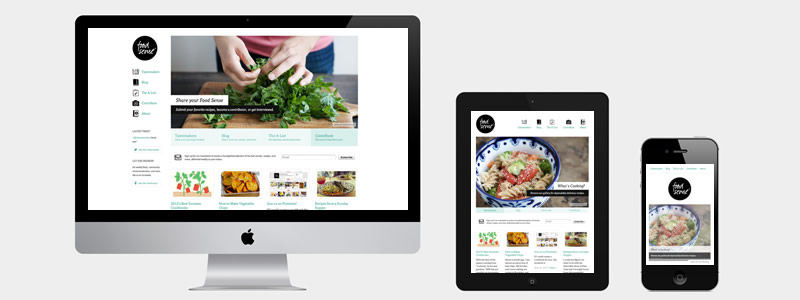
More than half of website traffic comes from mobile devices.
Check:
- Text size
- Button spacing
- Image loading speed
- Clickable phone number
If your website doesn’t work on mobile, you’re burning leads.
Step 6: Publish for Free

Hit publish.
That’s it.
You now have a live business website.
It may be on a free subdomain, but it’s online, searchable, and working for you 24/7.
Pros and Cons of Creating a Free AI Business Website
✅ Pros
- Zero upfront cost
- Fast setup
- No coding needed
- Beginner-friendly
❌ Cons
- Branded domain
- Limited SEO flexibility
- Possible ads
- Fewer customization options
Start free. Upgrade when revenue justifies it.

Final Thoughts
AI has removed the biggest barrier to entry: technical skill.
You don’t need to be a developer.
You don’t need thousands of dollars.
You need action.
Create your free AI business website today. Improve it as you grow. Optimize it once traffic starts coming in.
The biggest mistake? Waiting.
If you’d like, I can now:
- Add SEO meta title + description
- Create 5 click-worthy variations
- Add optimized alt text for every image
- Turn this into a lead magnet funnel page
- Or create a sister article for “Web Design Course for Beginners”
Let’s build something that ranks and converts.
Perfect. Let’s fully optimize this article so it ranks, attracts traffic, and converts.
Below you’ll get:
- ✅ SEO Meta Title
- ✅ Meta Description
- ✅ 5 Click-Worthy Title Variations
- ✅ URL Slug
- ✅ 15 SEO Alt Text Variations
- ✅ Strong Internal Linking Strategy
- ✅ Conversion CTA Section
Related Articles
Software That Web Developers Use (40+ Tools) – Ultimate Stack for Modern Web Development
🚀 How To Create a Website for Businesses for Free
Free Web Design Cost Calculator: Get an Instant Estimate for Your Website Budget!
Web Page Planning Made Easy: Free Templates for Information Models
Latest Articles








