Table of Contents
Writing a review on Google is a great way to share your experience with a business.
Reviews help other customers decide where to shop, eat, or hire services. Many people check reviews before choosing a business on Google.
Leaving a review only takes a few minutes and can help businesses improve their service.
Let’s walk through how to do it.
⭐ Why Google Reviews Matter
Google reviews help both customers and businesses.
Reviews allow people to:
- Share their experiences
- Recommend good businesses
- Warn others about problems
For businesses, reviews can:
- Build trust with new customers
- Improve local search rankings
- Increase website traffic and visits
This is why businesses encourage customers to leave feedback through Google Business Profile.
📌 Step 1: Sign in to Your Google Account
Before writing a review, you must sign in to your Google account.
If you don’t have one, you can create a free account at:
Once logged in, you can leave reviews for any business listed on Google.
📌 Step 2: Search for the Business
Use Google search or Google Maps to find the business.
Steps:
- Open Google or Google Maps
- Type the business name in the search bar
- Select the correct listing
You will see the business profile with ratings and customer reviews.
📌 Step 3: Click “Write a Review”
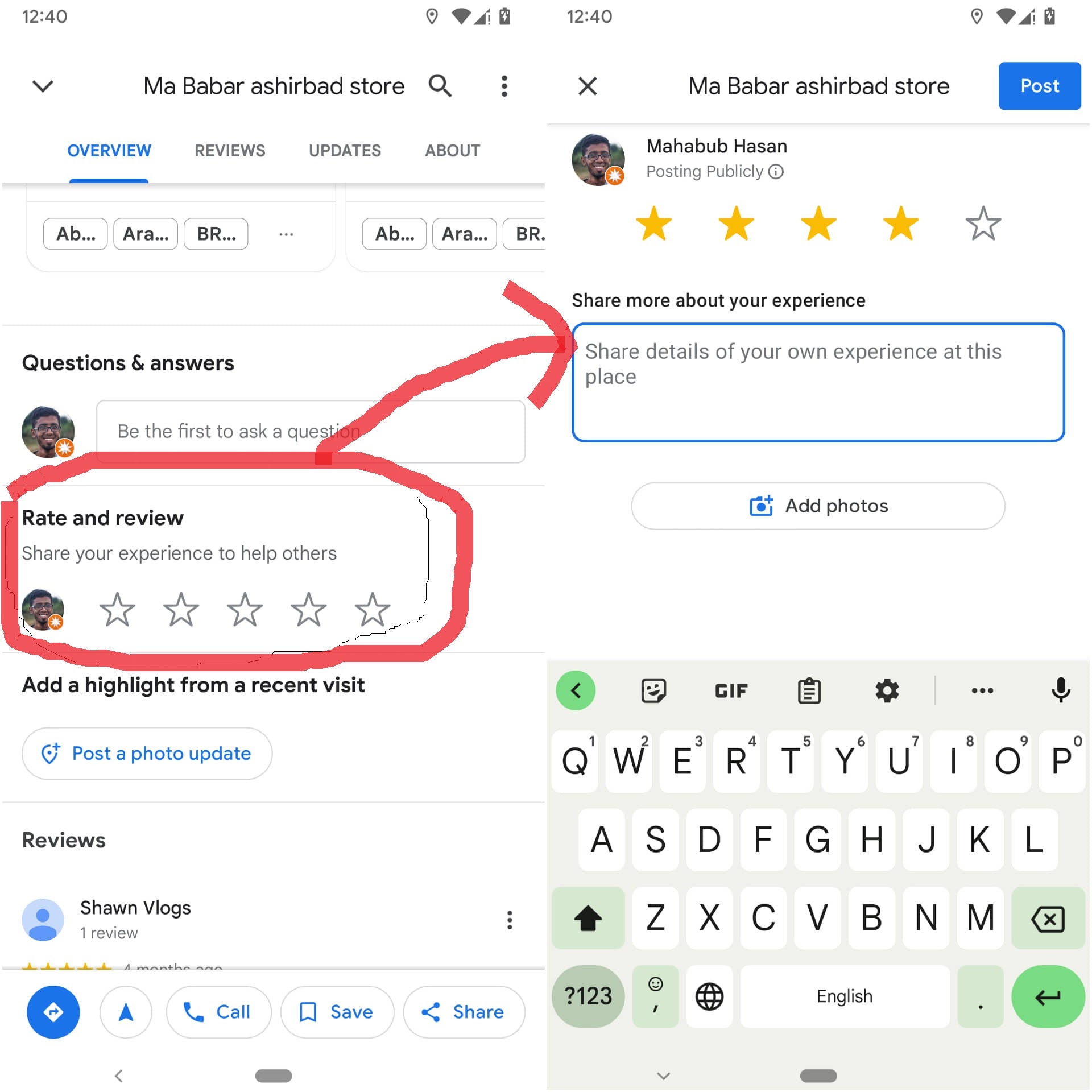
Scroll to the reviews section.
Look for the button that says “Write a Review.”
Tap or click the button to open the review form.
📌 Step 4: Choose a Star Rating
Google uses a 1–5 star rating system.
⭐ 5 stars – Excellent
⭐ 4 stars – Very good
⭐ 3 stars – Average
⭐ 2 stars – Poor
⭐ 1 star – Very bad
Choose the number of stars that matches your experience.
📌 Step 5: Write Your Review
After selecting a star rating, you can write a short message describing your experience.
Good reviews often include:
- The service you received
- What you liked about the business
- Whether you would recommend it
Example review:
“Great service and friendly staff. They completed the job quickly and explained everything clearly. Highly recommend.”
You can also upload photos if you want.

📌 Tips for Writing a Helpful Review
Helpful reviews usually include:
- Honest feedback
- Clear details about the experience
- Respectful language
Avoid:
- Offensive language
- Fake reviews
- Personal attacks
Google has guidelines to keep reviews fair and helpful.
You can read them here:
📊 Where Your Review Appears
After submitting your review, it will appear on the business profile.
Customers searching for businesses in places like New York City can see your review when they view the listing.
Your feedback may help someone decide which business to choose.
❓ Frequently Asked Questions
Do I need a Google account to leave a review?
Yes. You must be signed into a Google account.
Can I edit my review later?
Yes. You can update or delete your review anytime.
Are Google reviews free?
Yes. Writing and reading reviews is completely free.
Can businesses delete my review?
No. Businesses cannot remove reviews unless they violate Google policies.
Can I add photos to my review?
Yes. Photos help other customers see the business experience.
How long does it take for a review to appear?
Most reviews appear immediately, but sometimes moderation may delay them.
🎯 Final Thoughts
Learning how to write a review on Google is quick and easy.
All you need to do is search for the business, click Write a Review, choose a star rating, and share your experience.
Your review helps other customers make better choices and helps businesses improve their service.
Related Articles
How to Get 4.9 on Google Reviews: The Smart Strategy Local Businesses Use
Why Are My Google Reviews Not Showing Publicly? Easy Fix Guide
Why Google Reviews Are the New Word-of-Mouth for Accounting Firms
Latest Articles
-
How Accepted Insurance Plans Can Strengthen Medical Local SEO
When patients search for a doctor, they are not only looking for the right specialty or the closest medical office. Many also need to know whether the practice accepts their insurance. A patient might search Google for: If your website does not clearly list the insurance plans your practice accepts, Google and potential patients may…
-
Brooklyn Nursing Home Marketing in 2026: How to Turn Google Searches Into More Admissions
If you’re responsible for marketing or admissions at a nursing home, you already know how to generate business the traditional way. You know the importance of hospital relationships. You know your discharge planners, case managers, physicians, community partners, and referral sources. You know what happens to census when those relationships are strong, and you know…
-
Google Reviews and Search Console: Drive More Traffic to Your Queens Medical Practice
Google Reviews and Search Console: Drive More Traffic to Your Queens Medical Practice A patient in Queens searches Google for a family doctor, chiropractor, dentist, physical therapist, podiatrist, urgent care center, or medical specialist. Within seconds, that patient may see several practices competing for attention. The listings can look similar, but the patient still has…
-
How to Get More Reviews for Your Clinical Practice
Patient reviews have become an important part of how people choose a clinical practice. Before calling your office, a prospective patient may look at your Google rating, review count, recent feedback and how your team responds. A practice with a strong online reputation can appear more trustworthy and active. A practice with only a few…
-
Medical Office Staff Training Checklist for Better Reviews
Looking for a medical office staff training checklist that employees can actually use? Start with the complete patient journey—from the first phone call through the final follow-up. A five-star patient experience does not begin when someone leaves a Google review. It begins with the first phone call, online message, or front-desk conversation. Every employee who…
-
The Hidden Reason Patients Choose One Clinic Over Another.
Imagine This… Imagine it’s 7:30 on a Tuesday evening. Your office is closed, but your next patient is already looking for a physician. A family just moved into town. One of their children has a fever, and they need a family doctor they can trust. Instead of asking a neighbor for a recommendation, they pull…