


Building a website today isn’t just for coders anymore, guys.
Thanks to powerful web authoring tools, anyone — from business owners to students to creators — can design a beautiful, fully functional website without starting from scratch.
Whether you’re launching a portfolio, a brand, a store, or a personal blog, the right web authoring tool can make all the difference.
Today, we’re breaking down the best web authoring tools that help you build smarter, faster, and easier — without getting buried in confusing code.
What is a Web Authoring Tool?
A web authoring tool is software that lets you create websites visually, often without needing to hand-write HTML, CSS, or JavaScript.
Think of it like a creative studio for building your website: drag, drop, style, and publish.
The best tools:
Publish clean, mobile-friendly sites
Are user-friendly (even for beginners)
Allow full customization
Offer templates and design libraries
7 Web Authoring Tools So Good You’ll Never Struggle Building a Website Again

Top 7 Best Web Authoring Tools Right Now
1. Webflow
Best for: Designers and brands who want total creative control
- Professional-grade design freedom without coding
- Built-in hosting and SEO tools
- Responsive design out of the box
- Perfect for high-end portfolios, agencies, and boutique stores
Pro Tip: Webflow has a steeper learning curve, but the payoff is full creative control.
2. WordPress with Elementor
Best for: Bloggers, freelancers, and businesses
- Drag-and-drop design with Elementor plugin
- Thousands of templates available
- Full control over hosting and backend settings
- Massive community and support resources
Pro Tip: WordPress powers over 43% of all websites (W3Techs, 2023). It’s a safe long-term bet if you want flexibility.
3. Wix
Best for: Beginners and small businesses
Affordable and fast to launch
Easy drag-and-drop builder
Tons of modern templates
Built-in ecommerce, blogs, and portfolio features
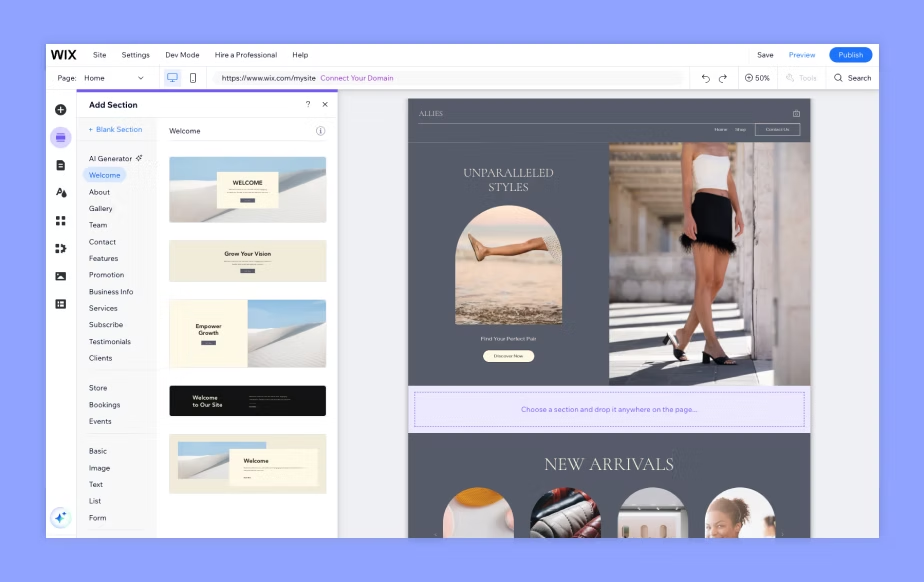
Pro Tip: Wix is great for quick projects, but you’ll want to keep an eye on page speed as your site grows.
4. Squarespace
Best for: Creatives and lifestyle brands
- Award-winning templates focused on visuals
- Integrated ecommerce and blogging
- Smooth mobile optimization
- All-in-one hosting and management
Pro Tip: Squarespace sites look polished fast, but customization beyond templates can be limited.
5. Adobe Dreamweaver
Best for: Developers and hybrid designer-coders
- Code editor + visual design interface
- Direct control over HTML, CSS, and JavaScript
- Great for custom, complex sites
- Strong integration with Adobe Creative Cloud
Pro Tip: Best if you already know (or want to learn) some coding alongside design.
6. Google Sites
Best for: Internal projects, personal use, small community sites
Integrates with Google Drive
Free and super simple
Great for portfolios, classroom pages, or internal company sites

Pro Tip: Google Sites isn’t for big, public brands — but it’s great for quick internal websites.
7. Subpage (Offline Builder)
Best for: Offline web design with full control
- Build fully offline without needing Wi-Fi
- Own your site files (HTML/CSS) outright
- Fast, flexible, lightweight
- Perfect for freelancers and brands that want independence
Pro Tip: Subpage is excellent if you value security, speed, and building without cloud platform lock-in.
How to Choose the Right Web Authoring Tool
Ask yourself:
Ownership: Do you want full control of your files or are you okay renting a platform?
Skill Level: Do you need something ultra-simple, or do you want to customize deeply?
Project Type: Are you building a store, a blog, a portfolio, or something else?
Budget: Some tools are free, others require subscriptions or hosting costs.

Choosing the right tool is about finding the balance between freedom and support.
Beginner Mistakes to Avoid When Using Web Authoring Tools
Web authoring tools make building a site easier than ever — but if you rush in without a plan, it’s still easy to mess things up.
Here are the biggest beginner mistakes to watch out for (and how to avoid them):
❌ 1. Choosing a Tool That’s Too Complex
It’s tempting to pick the flashiest, most “professional” platform out there.
But if you’re a beginner, starting with something like Webflow or Dreamweaver might leave you frustrated and stuck.
Fix It:
Match the tool to your skill level. If you’re just starting, try Wix, Squarespace, or Google Sites first. You can always upgrade later.
❌ 2. Ignoring Mobile Optimization
Over half of all internet traffic is mobile — yet too many beginners build for desktop only.
If your site looks bad or loads slow on a phone, you’re losing visitors instantly.
Fix It:
Always preview and tweak your site for mobile before you publish. Most builders have built-in mobile view modes — use them.
❌ 3. Using Overloaded Templates Without Editing
Pre-made templates are great — but if you just slap your logo on a crowded, messy template without editing it down, it’ll confuse visitors.
Fix It:
Simplify. Delete sections you don’t need. Focus your site around one main goal — not five.
❌ 4. Forgetting About SEO Basics
A beautiful site that nobody finds is just a digital ghost town.
Beginners often skip basic SEO settings — titles, descriptions, alt text for images, fast loading — and wonder why traffic stays low.
Fix It:
Use your builder’s SEO tools! Set page titles, meta descriptions, and image alt text.
(Quick bonus: Compress images before uploading them to keep your site fast.)
Quick Tip:
If you’re not sure if your site is ready, test it.
Show it to someone who’s never seen it before and watch how they move through it.
If they get confused or lost — fix it before you go live.
Building smart from day one saves you a lot of headaches later.

Related Articles
Website Builders SEO: Boost Your Rankings Fast with These Amazing Tools
Save Time and Boost Your Business with Lookhin4’s Website Builder Template
Web Page Design Process: Simple Steps to Build a Better Site
How to Create a Business Website and Improve SEO
Latest Articles










