

Have you ever wondered how some websites always seem to show up on Google while others are buried on page 10? The secret isn’t luck—it’s keyword research and smart SEO tools.
If you’ve never done keyword research before, don’t worry. You and I are going to walk through it step by step. And the tool that makes it super simple? SEMrush.
So, What Is SEMrush?
So, you might be asking, “What is SEMrush and why do people keep talking about it?” Honestly, when I first started learning about SEO, I was super confused too. But here’s what I’vefigured out so far:

SEMrush is an all-in-one digital marketing tool that helps you see what people are searching for online and how you can use that info to grow your website or online store.
I like to think of it as a Swiss Army knife for SEO — it’s got a tool for almost everything you’ll ever need. And the cool part? You don’t have to be an expert to start using it.
Here’s what I’ve learned it can do:
✅ Keyword Research – You can find out what words people are actually typing into Google. For example, instead of just targeting “shoes,” you might discover people search for “best running shoes for flat feet under $100.” That’s called a long-tail keyword, and it’s way easier to rank for.
👉 You can read more about long-tail keyword research here: Ahrefs Keyword Research Guide.

✅ Competitor Analysis – This one’s fun because you can “spy” (legally!) on your competitors. SEMrush shows you what keywords other sites are ranking for so you can decide if you should target those too.
👉 Moz has a great beginner guide on Competitor Analysis.
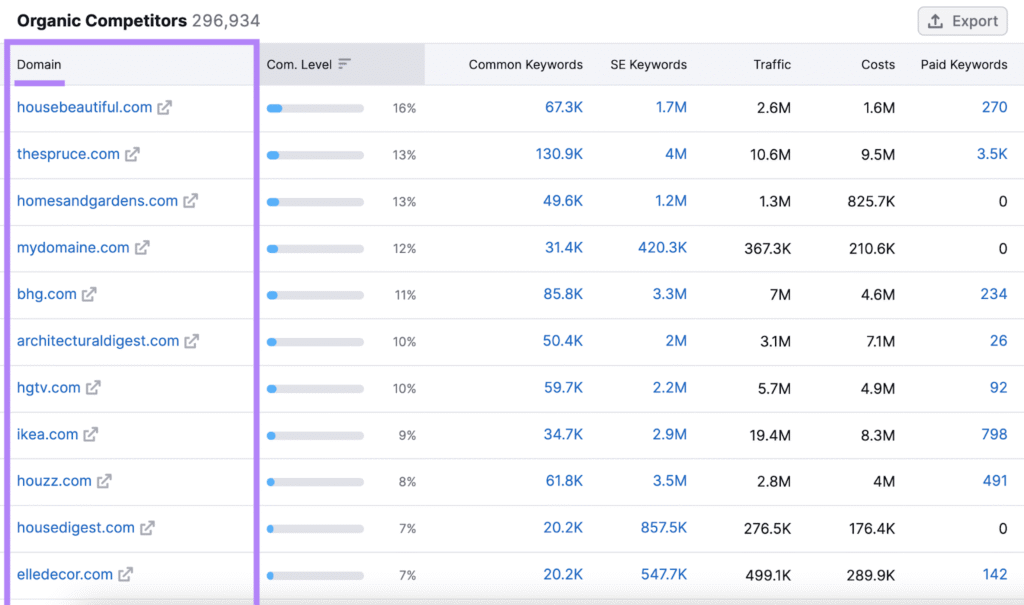
✅ Backlink Tracking – Backlinks are just other websites linking back to yours. Google sees that as a sign of trust. SEMrush shows who’s linking to your site (and your competitors), so you can try to get similar links.
👉 If you’re still learning backlinks (like me), here’s a solid guide: Backlinko’s Link Building Guide.
How URL Structures Drive SEO, Backlinks & Clicks: My Simple Guide



✅ Site Audits – This one saved me a headache. SEMrush runs a site audit and tells you what’s broken—like slow page speed, missing alt text, or duplicate meta descriptions. Basically, it’s like taking your site to the doctor for an SEO check-up.
👉 Google has their own free tool for this too: PageSpeed Insights.
How Google’s Page Speed Impacts Your SEO -(Why Mobile Speed = Great Rankings)
✅ Content Ideas & Optimization – If you’re stuck thinking, “What should I write next?”, SEMrush gives you topic ideas based on real search data. It even helps you optimize your blog posts by checking for things like keyword density and related terms.


✅ PPC Insights – If you run Google Ads, SEMrush helps you make them more effective by showing you what’s working (and what’s wasting money).
Organic SEO vs. PPC: How I Built My Website for Long-Term Successnals.
✅ Social Media Tools – Yup, it even has tools for Facebook, Instagram, and Twitter/X. You can schedule posts, track engagement, and compare your results.


✅ Rank Tracking – SEMrush keeps track of your keywords and shows if your site is moving up or down in Google search. This is super helpful if you’re testing new title tags or content strategies.
So… Why Should You Care?
If you’re like me and still learning, SEMrush is basically like having a digital marketing assistant. It tells you:
Which keywords to target
Which pages need fixing
Which competitors to watch
And how to get more traffic without guessing
And honestly, when you’re running a dropshipping store or a blog, guessing can cost you time and money.
That’s why I’m starting to see SEMrush not just as a tool, but almost like a mentor for SEO.
👉 If you want to check it out, here’s their site: SEMrush Official Website.
How to Use SEMrush for Keyword Research (Beginner-Friendly)
Keyword research might sound technical, but here’s how simple it is with SEMrush:
- Type in a Topic or Word – Let’s say your website is about fitness. You enter “home workouts.”
- Get Keyword Ideas – SEMrush shows you all the related searches people use, like “best home workout for abs” or “home workout without equipment.”
- Check Search Volume – You can see how many people search for those terms every month.
- Check Keyword Difficulty – SEMrush tells you how hard it is to rank for those words.
- Pick the Best Ones – You choose keywords with a good balance of traffic and lower competition.

SEMrush vs Ahrefs: What’s the Difference?
Both SEMrush and Ahrefs are big players in SEO, but they shine in different ways.
SEMrush: Best for keyword research, competitor analysis, PPC insights, and content marketing. It’s like a full marketing toolkit.
Ahrefs: Best for backlink analysis and raw SEO data. Many SEO pros love it for checking links and site authority.
👉 If you’re a beginner, SEMrush is usually easier to learn because it has guided tools and broader features.
👉 If you’re a link-building pro, Ahrefs might feel sharper.
Honestly, a lot of consultants (including me) use both.
Why SEMrush Is Worth It (Even If You’re Just Starting Out)
When I first got into SEO, I used to guess at what to write—and it rarely worked. Once I started using SEMrush, everything changed. Suddenly, I wasn’t guessing anymore—I was writing what people actually searched for.

And the best part? SEMrush doesn’t just stop at SEO. You can use it for content planning, reputation management, and even social media scheduling.
If you’re serious about building your online presence—whether you’re using a website builder, running a small business, or just blogging—SEMrush gives you the tools to compete with bigger brands.
Conclusion: What Is SEMrush Used For?
So, back to our big question: What is SEMrush used for?
It’s used to find the right keywords, analyze your competitors, track your growth, and fix issues that keep your site from ranking. Basically, it helps you get seen on Google.
You and I both know—if people can’t find you online, they can’t buy from you, read your blog, or learn about your brand. That’s why SEMrush is such a powerful tool.
And here’s my tip as an SEO consultant: Start simple. Use SEMrush to do your first keyword research, write content around those keywords, and track your progress. You’ll be amazed at how fast you’ll see results.
Faceless Marketing for eCommerce: How to Increase Conversions
Optimized Title Tags for Faceless Marketing: 7 Secrets to Success
Meta Descriptions That Sell: How to Get Clicks Without Clickbait
Header Tag Structure (H1–H6): The SEO-Friendly Guide for Better Rankings
Internal Linking Strategy: How to Boost SEO and Keep Readers Engaged








