


So, you want to post every single day without burning out or going broke on coffee? Same. When I first became a Full Time Content Creator, I believed the myth that “just be consistent” was enough advice to carry me. Spoiler alert: it wasn’t.
Consistency doesn’t come from willpower. It comes from preparation—having a system that works even when you don’t feel creative or inspired.
In this guide, I’ll walk you through exactly how to prepare to create daily content as a full time creator, covering everything from batching and scheduling to creative mindset and recovery.
Let’s break it all down—real tools, honest advice, and no fluff.
The Realities of Daily Content Creation
Why Consistency Matters in the Algorithm Era
Every platform—Instagram, TikTok, YouTube—rewards regular posting. In fact, the TikTok algorithm favors creators who post 1–4 times per day. But here’s the twist: quantity without quality? Useless.
Common Misconceptions About Daily Posting
Many new creators assume:
- You need to film fresh content every day (nope!)
- Posting daily burns you out (not if you’re smart about it)
- You have to be “on” all the time (nope again)
Understanding the truth here is the first step in learning how to prepare to create daily content.

Building the Creator Mindset for Consistency
Embracing the Lifestyle of a Full Time Content Creator
Being a Full Time Content Creator is a lifestyle shift. It’s not just about “posting daily”—it’s about integrating content creation into your everyday rhythm.
Preparation starts with mindset:
- You’re not just an artist, you’re also a producer.
- You’re not waiting for inspiration—you’re creating a process that breeds it.
This mindset lets you treat content creation like a career, not a chore.
Overcoming Perfectionism and Impostor Syndrome
One major blocker to consistency? Thinking every piece must be your magnum opus.
But hear me: done is better than perfect.
Your audience won’t remember how polished something was—they’ll remember how consistent and valuable you were. Use affirmations, journal when doubts creep in, and remind yourself: even your “worst” content is better than none.
Goal-Driven Planning: Starting with the End in Mind
Defining Your Content Pillars and Audience Intent
If you don’t know what your content stands for, you’ll burn out fast.
Define your content pillars—three to five themes that shape everything you post. For me, it’s:
- Content creation tips
- Behind-the-scenes creator life
- Monetization strategies
Align each post with these themes to stay focused.
Aligning Weekly Output with Monthly Objectives
Each month, I set one goal: grow YouTube subs, launch a mini-product, build my email list, etc.
Then I reverse-engineer weekly posts to drive toward that. It’s how I stay strategic, not reactive.
Choosing the Right Platforms to Post Daily
Platform-Specific Strategies for TikTok, YouTube, and Instagram
Not all platforms require the same energy. If you’re wondering how to prepare to create daily content, choose your battles:
- TikTok: Fast, raw, trend-driven. Great for daily short-form.
- Instagram: Heavily visual; Stories and Reels thrive here.
- YouTube: Longer-form, more polished. Batch and upload 1–2x per week.
Tailor content creation to platform dynamics so you don’t get overwhelmed.
Avoiding Burnout by Prioritizing Key Channels
You don’t have to be everywhere. Focus on 1–2 main platforms and repurpose across others. That’s how the pros stay consistent without going crazy.
Time Management Tips That Actually Work
Time Blocking and Creator Hour
I time-block every weekday from 9:00 AM to 12:00 PM for creative work. That’s my “Creator Hour.” During this time, I script, film, edit, or plan. No emails, no calls—just pure creation.
Avoiding Multitasking and Distractions
Multitasking kills focus. Instead, batch similar tasks:
- Monday: Ideation
- Tuesday: Scriptwriting
- Wednesday: Filming
- Thursday: Editing
- Friday: Engagement + Scheduling
Using the Pomodoro Technique
The Pomodoro Technique (25 minutes work, 5 minutes rest) keeps me productive without burnout. Use apps like Focus Keeper or Toggl to time your sessions.
How to Batch Create Content Efficiently
Planning a Batching Day
Want to master how to prepare to create daily content? Batch it.
I batch record 4–5 videos per session. This gives me content for the week. Batching frees up mental space and avoids the “what do I post today?” stress.
Scriptwriting, Shooting, and Editing in Batches
Each task gets its own batching window. One day for scripts, another for filming, then a final for editing. This streamlines your flow and keeps you in the creative zone.
Tools That Make Batching Easier
Use:
- Notion or Trello for planning
- CapCut or Final Cut Pro for video edits
- Descript for fast editing and captions
Scheduling Like a Pro: Automate and Relax
Using Tools Like Buffer, Hootsuite, and Later
After batching, I schedule everything using Later for Instagram and Hootsuite for Twitter and LinkedIn. Automating your content lets you focus on creation, not constant posting.
Best Times to Schedule Content for Engagement
According to Sprout Social:
- Instagram: 11 AM – 1 PM, 7 PM – 9 PM
- TikTok: 6 PM – 10 PM
- YouTube: 12 PM – 4 PM
Test and tweak based on your analytics.

Crafting a Weekly Content Calendar
Editorial vs. Visual Calendar
A visual calendar shows what goes out and when. An editorial calendar includes ideas, captions, CTAs, and hashtags.
I use Notion for both. It holds:
- Weekly goals
- Post titles
- Content types (Reel, carousel, story)
- Status (idea, drafted, scheduled)
Having a visual + editorial system helps me stay consistent across platforms as a Full Time Content Creator.
Reusing and Repurposing Content Smartly
Repurposing is a consistency cheat code. Here’s how:
- YouTube video → 3 TikTok clips
- Instagram carousel → Pinterest pin
- Blog post → Email newsletter
When you know how to prepare to create daily content, you start thinking of each piece as a content tree with multiple offshoots.
Balancing Quality and Quantity
When to Go Deep vs. When to Go Fast
Not every post needs to be a deep dive. Mix quick hits (memes, quotes) with in-depth tutorials.
This way, you stay visible daily without exhausting yourself. The key is setting minimum viable quality. For me, that means:
- Good lighting
- Clear audio
- Clear CTA
Templates and Systems to Maintain Brand Voice
I use content templates to keep branding consistent. I’ve created:
- Caption formula guides
- Design templates in Canva
- Video intro/outro templates
These reduce creative decision fatigue and help me scale up.
Creating Evergreen Content for Daily Use
Ideas That Stay Relevant All Year
Evergreen content is gold. Here are my go-to formats:
- “How-to” tutorials
- Listicles and tool roundups
- Myth-busting posts
- FAQs
These can be batched in bulk and sprinkled throughout your calendar to fill gaps.
Quick Evergreen Content Formats
Easy daily formats include:
- Before/after transformation
- Tips in 30 seconds
- Weekly routines
- Screenshots of testimonials
Build a bank of 10–20 evergreen posts and reuse them every 3 months.
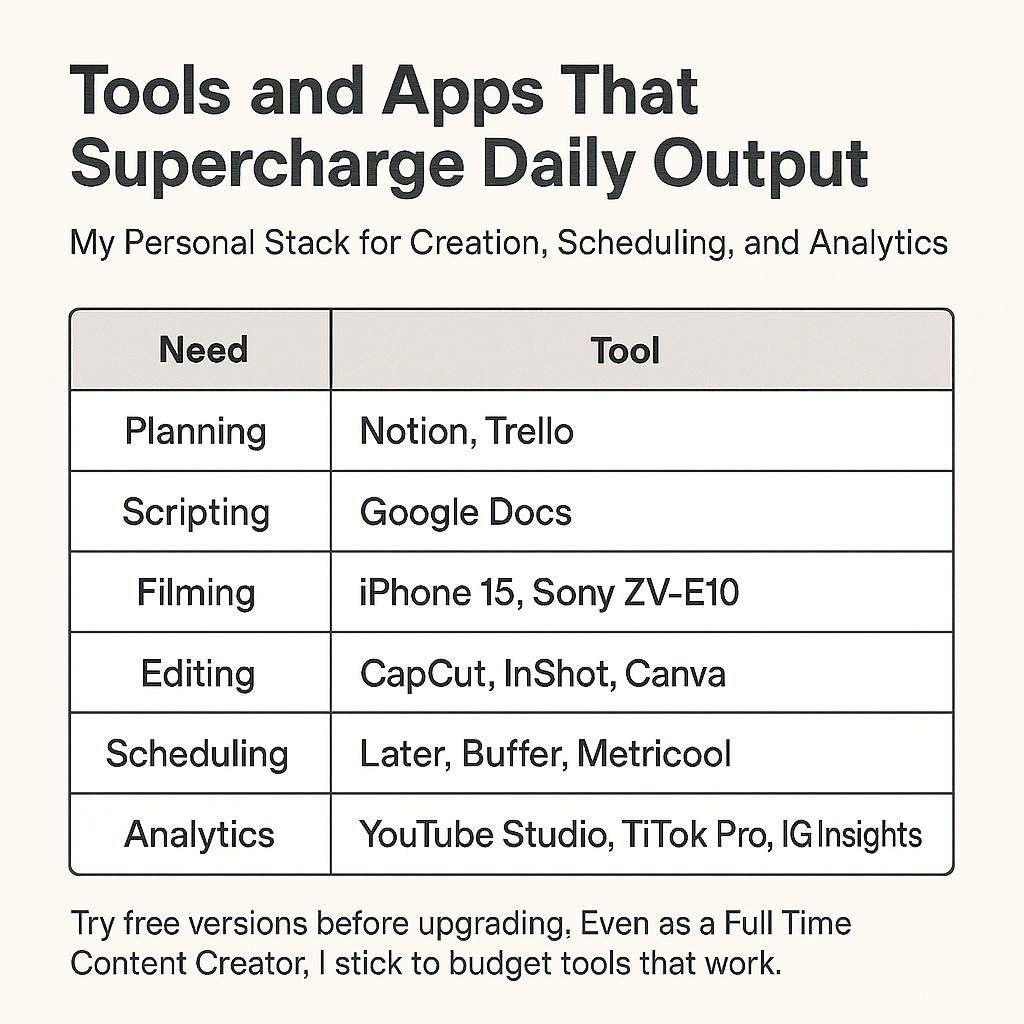
Tools and Apps That Supercharge Daily Output
My Personal Stack for Creation, Scheduling, and Analytics
Here’s what I use to prepare for daily content creation:
Building Support Systems as a Full Time Content Creator
Outsourcing Editing or Admin
I started outsourcing editing after month 6. Sites like Fiverr, Upwork, or EditorX are great for finding affordable help.
Even 5 hours of editing off your plate per week can unlock creative energy for more ideas.
Working with a Virtual Assistant or Creative Partner
My VA handles:
- Post scheduling
- Hashtag research
- Comment replies
We sync once a week on Zoom. You don’t need a big team to feel supported—just one reliable partner can double your efficiency.
Tracking Progress and Tweaking the Strategy
Weekly Content Reviews
Every Sunday, I spend 30 minutes reviewing:
- Top 3 performing posts
- Worst performing post
- What trends or topics resonated
Then I tweak next week’s calendar accordingly.
Adjusting Based on Engagement and Reach
Data doesn’t lie. If your audience is engaging more with Reels than carousels—lean into that. Use tools like Metricool or Iconosquare for visual dashboards.
Managing Creative Blocks and Burnout
Preventing Mental Fatigue
When I feel drained, I do less scrolling and more creating. I also step outside, unplug, and journal. You can’t pour from an empty cup.
Mindfulness and Downtime Techniques
Daily habits that keep me grounded:
- 10-minute morning meditation (I use Insight Timer)
- Weekly no-social-media day
- Stretch breaks between filming sessions
This is self-care for the Full Time Content Creator soul.
Staying Inspired and Evolving with Trends
Following Trends Without Losing Your Voice
Jump on trends, yes—but always remix them with your brand voice. Save audio clips, popular post structures, and recreate them in your own niche.
Learning From Analytics and Community Feedback
Your audience tells you what they love. Listen. Every DM, comment, or “save” is a clue. Build your next content strategy around it.

FAQs on Preparing to Create Daily Content
1. Do I really need to post every day to grow as a creator?
Not necessarily, but posting daily increases visibility and speeds up your learning curve. If you can’t post every day, aim for consistency—even if that’s 3–4 times a week.
2. How do I find time to create content daily with a full-time job?
Batch your content on weekends. One filming session can produce 5–10 posts. Use scheduling tools to keep your feed active while you focus on your 9-to-5.
3. What’s the easiest type of content to post daily?
Short-form videos (like Reels or TikToks) and quote graphics are fast to produce. Use templates to make them in minutes.
4. How do I stop second-guessing my content?
Focus on value, not perfection. Remember, social media moves fast—what seems “meh” to you could be gold for your audience.
5. Can I repurpose my old content?
Absolutely. Take a well-performing post from three months ago, update the caption or format, and post it again. Repurposing is a key part of how to prepare to create daily content sustainably.
6. How far ahead should I plan my content?
Ideally, 2–3 weeks out. I try to keep a rolling 14-day content buffer. This gives room for spontaneous ideas while maintaining consistency.
Conclusion: From Preparation to Progress – Make Daily Content Your Superpower
If you’ve made it this far—bravo. You now know that how to prepare to create daily content isn’t just about grinding. It’s about:
- Planning smart
- Batching wisely
- Using tools that work
- Staying flexible
Consistency doesn’t mean perfection. It means showing up prepared. With the right systems in place, daily content becomes not just doable—but enjoyable.
Start small. Pick your pillars. Build your workflow. And most importantly—press publish.








