

So we’re gonna talk about how to write a website traffic analysis report. You’ve got to start with a clear introduction. You know you have to state your purpose of the report, why you’re here, what you’re doing with the report. Mention the time period of what you’re writing about. Example: “This report analyzes website traffic of January 25, focuses on user behavior, traffic sources, and growth opportunities.”
You also want to define the key metrics you’ll cover. A good SEO report is going to focus on the essentials from Google Analytics and other analytical tools. Assessing users. You want to break down the traffic sources, show which channels are driving the most traffic, organic search, direct, referrals, social media, paid ads, and any other traffic sources that you use to bring people into your website. Highlighting trends is key. Using comparisons month over month, year over year.
Cool — now let me take you through all nine steps we use. You and I will build this together.
1. Introduction: Purpose & Time Frame
You start by telling people why this report exists. Maybe something like:
“This report covers website traffic from June 1–30, 2025. I’m looking at how users behave, where traffic is coming from, and where we’ve got growth chances.”
Be clear. Say what you hope to learn. You’re here to measure, to spot what’s working, and to find what needs fixing.
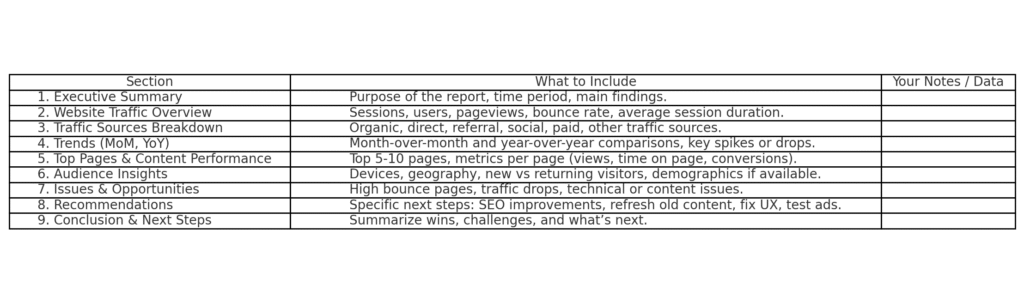
2. Define Key Metrics (What I’m Watching)
You and I need to choose metrics that actually matter. Some of the big ones:
- Sessions / Users → how many visits, and how many unique people
- Pageviews → how often pages are seen
- Bounce Rate → % who leave after one page
- Average Session Duration / Time on Page → how long people stick around
- New vs Returning Visitors → are people coming back?
- Conversion Rate / Goal Completions → signups, sales, etc.
These are pulled from tools like Google Analytics, or maybe even Matomo. These metrics are standard. (See what Leadfeeder calls “Top eight website traffic analytics to track” for reference.) (Leadfeeder)
3. Break Down Traffic Sources
Now, show where people came from. Which channels brought traffic? You want this in your report:
- Organic Search
- Direct
- Referral Links
- Social Media
- Paid Ads
- Others (e.g. email campaigns, affiliates)
For example: “Organic search drove 50%, referrals 10%, social media 15%, etc.” This helps you see which traffic sources are strong and which need work.
4. Highlight Trends (Month-over-Month, Year-over-Year)
Trends tell stories. You and I both know that a single week of good traffic doesn’t always mean you’re winning — context matters.
- Compare to last month (MoM): did traffic go up or down?
- Compare to same period last year (YoY): is this growth or seasonal dip?
- Spot peaks & valleys: maybe you published something, ran an ad, or something broke.
These comparisons help you see momentum or warning signs.
5. Top Pages & Content Performance
Don’t just look at overall numbers — get into the pages. Which blog posts or landing pages got the most views? Which ones had high engagement?
For each of top 5-10 pages, report:
- Page views
- Average time spent on page
- Bounce rate for that page
- Conversion rate (if applicable)
If a page is getting lots of visitors but no conversions, you need to tweak it.
6. Audience Behavior & Demographics
You want to know who your traffic is. This is what I include:
- Device types (mobile vs desktop) — mobile matters a lot.
- Geography (countries, cities)
- New vs returning users
- Possibly demographics (age, gender) if you have it.
This helps you make content and site design decisions based on who is actually visiting. If 80% of your traffic is mobile, you better have a mobile-friendly layout.
7. Identify Problems & Opportunities
This is where you get real: what’s holding you back? And where are the chances?
Problems might be:
- High bounce rate on key pages
- Traffic drop in a channel (say social media)
- Slow loading times (site speed sucks)
- Content not matching what users search for
Opportunities might be:
- Topics that are trending but under-covered
- Pages with decent traffic but low conversions
- New traffic sources you haven’t explored
- Using SEO or adding backlinks to improve organic reach
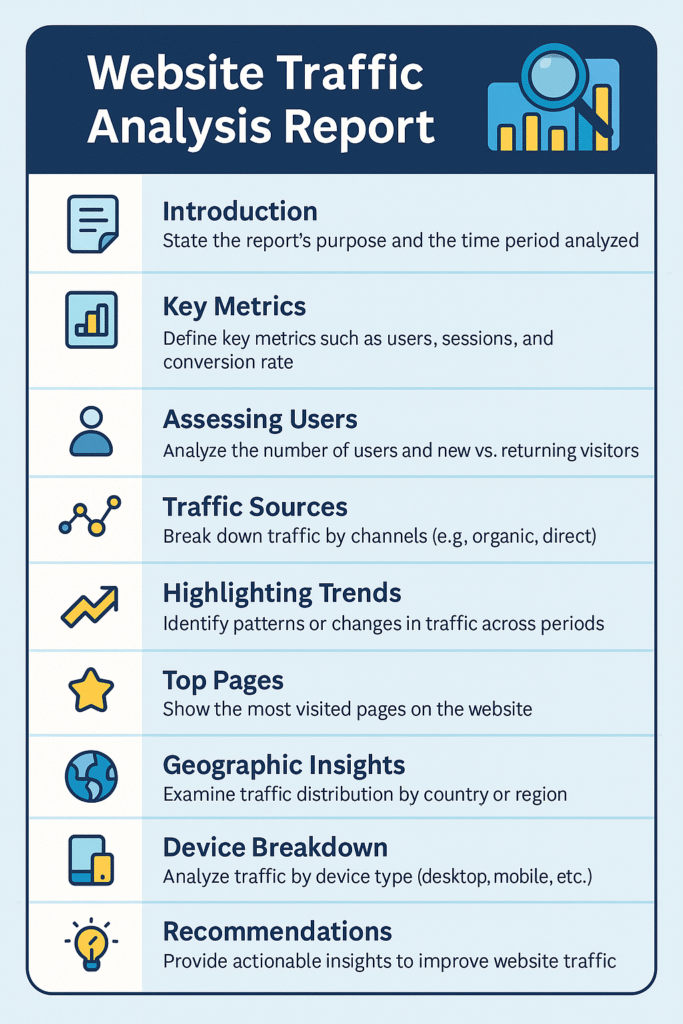
8. Recommendations (What You & I Should Do Next)
Now that you see the story in the data, you and I make a plan. Recommendations are actionable, specific:
Optimize mobile UX if many users are mobile
Improve page speed on pages with high bounce rate
Refresh older content that gets traffic but low engagement
Invest more in SEO for keywords that are driving traffic
Try paid ads only after you’ve got a baseline of organic traffic
9. Conclusion: Summarize and Plan Ahead
Wrap it up cleanly. Say:
- Key wins this period
- Main things that need attention
- What you will do next (your to-do list)
For example: “Traffic rose 20% this month, mainly from organic search. But mobile users are bouncing too fast. I’m going to fix mobile layout and refresh top landing pages. Then I’ll test a small ad budget on best-performing content.”
Sources to Help You
- “Website Traffic Analytics: Eight Key Metrics To Track” (Leadfeeder) — good reference for metrics you must track. (Leadfeeder)
- “16 Website Metrics to Track for Growth in 2025” (HubSpot) — more engagement metrics. (HubSpot Blog)
- “20 Website Metrics to Track for Success” (Optimizely) — especially bounce rate, session duration, pages per session. (Optimizely)
Related Articles
Website Traffic: How to Get More Visitors Without Wasting Time or Money
SEO Strategies to Boost Website Traffic for Beginners [Easy Steps]
SEO vs. Paid Ads: Which Brings Better Long-Term Results
Referral Links vs Backlinks: What 91% of Websites Get Wrong About Traffic and Growth
Which Report Indicates How Traffic Arrived at a Website: Easy Breakdown
Local SEO and Website Traffic for Small Businesses: A Simple Guide to Winning Local Customers








