


The Real Question You Should Be Asking
Do you really know where your website traffic comes from? Most business owners don’t. And here’s the truth: if you don’t know your traffic sources, you’re guessing instead of growing.

The good news? There’s a clear answer. The Traffic Sources Report in tools like Google Analytics shows you exactly how people are finding your website. Whether it’s through search engines, social media, referrals, or paid ads, this report helps you see what’s working and what’s not. And once you know that, you and I can make smarter choices to bring in more of the right visitors.

👉 If you’re brand new to Google Analytics, here’s a great beginner’s guide from Google itself to get you started.
“When clients ask me Which Report Indicates How Traffic Arrived at a Website, I always point them to the Traffic Sources Report in Google Analytics—it’s where clarity begins.”
Why Knowing Your Traffic Sources Matters
Think of it like this: you’re posting on Instagram, running SEO, maybe even trying a few ads—but you have no idea which one is actually driving traffic. That’s like throwing darts in the dark.
By tracking traffic source reports, you and I can:

See which channels work best. (Double down on what’s bringing in results.)
Understand user behavior. (Organic search traffic acts differently than paid traffic.)
Save money. (Spend only where it pays off.)
Find new opportunities. (Maybe a blog post or partner site is sending you free visitors without you even knowing.)
👉 Want to learn why traffic data matters for business growth? HubSpot explains it here.
Which Report Tells You How Traffic Arrived at a Website?
The Traffic Sources Report is your go-to tool. In Google Analytics, you can break down website traffic into:
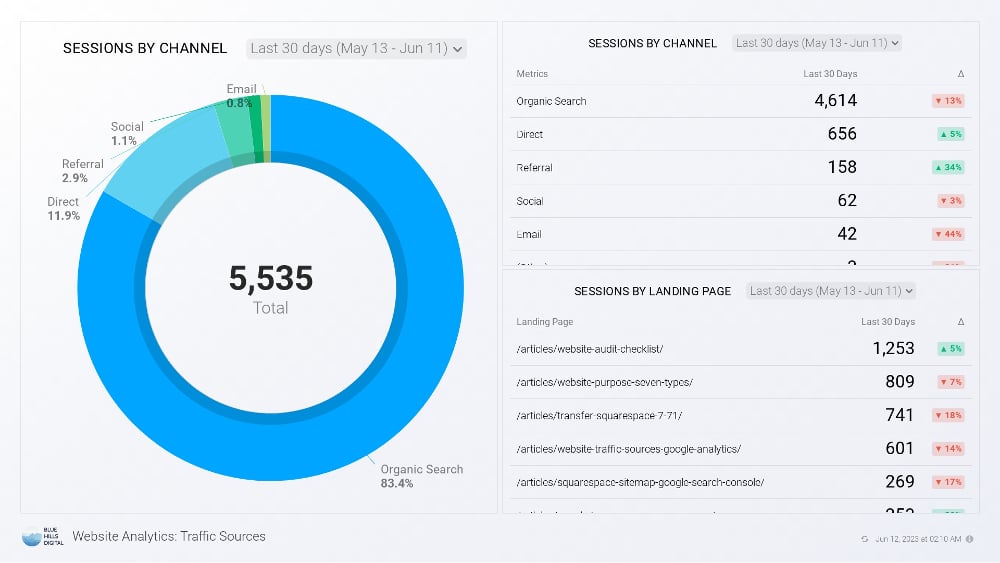
Organic Search: Free traffic from Google, Bing, and other search engines.
Direct Traffic: People typing your URL directly or using a bookmark.
Referral Traffic: Visitors clicking through from other websites.
Social Traffic: Visitors from Facebook, Instagram, TikTok, LinkedIn, and more.
Paid Traffic: Visitors from ads like Google Ads or Facebook campaigns.
👉 For a deeper dive into traffic reports, check out Semrush’s guide to traffic analytics.
“The real answer to Which Report Indicates How Traffic Arrived at a Website is not just the Traffic Sources Report, but how you use that data to grow smarter.”
My Personal Take
I’ll be honest with you—when I look at traffic sources, I’m not just looking for numbers. I’m looking for patterns. Which posts are bringing in the right people? Which ads are worth keeping? Which social channel is actually worth my time?

If you and I know these answers, we can create better titles, stronger content, and smarter ads. Instead of wasting time on platforms that don’t bring results, we put our energy into the ones that truly matter. And that’s how you grow.

Now here’s the bigger picture: this is why SEO is so important. SEO isn’t just about ranking higher on Google—it’s about building a website that works hand in hand with your traffic data. Strong web design makes your site easier to navigate, while thoughtful SEO consulting ensures every page is optimized to capture the right audience. Together, these elements create a digital presence that not only attracts visitors but converts them into loyal customers.
And here’s the key connection: when you know which report indicates how traffic arrived on website in Google Analytics, you unlock insights that shape smarter SEO decisions. You’re not just guessing where visitors come from—you can see whether it’s organic search, social media, referrals, or direct traffic.
When you connect web design, SEO, and traffic analysis, you’re not just running a website—you’re building a system that continually improves. That’s why understanding your traffic sources isn’t just helpful; it’s one of the most important parts of SEO itself.
How to Find Traffic Sources in Google Analytics
Finding your traffic sources in Google Analytics is easier than you might think, and it’s one of the most valuable habits you and I can develop for improving website performance. Here’s how to do it step by step:
Select “Traffic Sources.” Here you’ll find a full breakdown of how visitors discovered your site—through SEO, social media, referrals, paid ads, or direct visits.
Log in to Google Analytics. Make sure you’re signed into the correct account.
Go to the property you want to analyze. If you manage multiple websites, select the one you want to review.
Click on “Acquisition” in the left-hand menu. This is where Google Analytics organizes your incoming visitor data.
Once you open this report, you’ll be able to see which channels are performing best. This is where good keyword research and on-page optimization pay off. For example, if organic traffic is strong, it means your SEO efforts (and maybe even your use of optimized alt text for images) are working. If paid traffic is outperforming, you may want to fine-tune campaigns with the help of an SEO consultant or digital marketing expert.
By reviewing traffic sources consistently, you can identify which channels deserve more attention and which ones may need adjustment. Tools like Google’s own Analytics Help Center make it even easier to interpret your data.

“The answer to which report indicates how traffic arrived at a website is simple: the Acquisition Report in Google Analytics—it’s your roadmap to understanding exactly where your visitors come from.”
Conclusion: Which Report Really Matters?
So, let’s circle back to the question: Which report tells you how traffic arrived at a website? The answer is the Traffic Sources Report.
Why does it matter so much? Because if you don’t know your traffic sources, you don’t know how to target the right people. And if you don’t know how to target, you’re leaving money on the table.
When you and I start using traffic source reports, everything changes. We stop guessing. We know what’s working. We know where to focus. And we can finally see our marketing pay off in real numbers.
Here’s my final thought for you: if you want to grow your business, you need to know where your audience is coming from. Website traffic is the heartbeat of your online presence. Once you know what drives it—SEO, paid ads, referrals, or social media—you’ll know exactly where to put your time and energy. That’s how you move from just “running a website” to actually building a business that grows month after month.
Long-Tail Keywords in SEO That Will Actually Drive Traffic
How to Master Website Traffic Generation: A Beginner’s Guide to Key Terms
How to Ethically “Steal” Traffic and Visitors from Competitor Websites
SEO vs. Paid Ads: Which Brings Better Long-Term Results
SEO Service Page Optimization: The Ultimate Checklist for Agencies & Freelancers








