What does a technical SEO audit consultant actually do—and why does it matter?
As a technical SEO audit consultant, I’ve learned that behind every high-performing website is a solid technical foundation. It’s not just about keywords or content—it’s about making sure your site is fast, crawlable, mobile-friendly, and structurally sound. Whether I’m optimizing my own site or working with clients, my job is to uncover and fix the hidden issues that block visibility and drag down performance. From site speed to structured data, here’s how I approach technical SEO to drive better rankings, traffic, and results.

What Is a Technical SEO Audit?
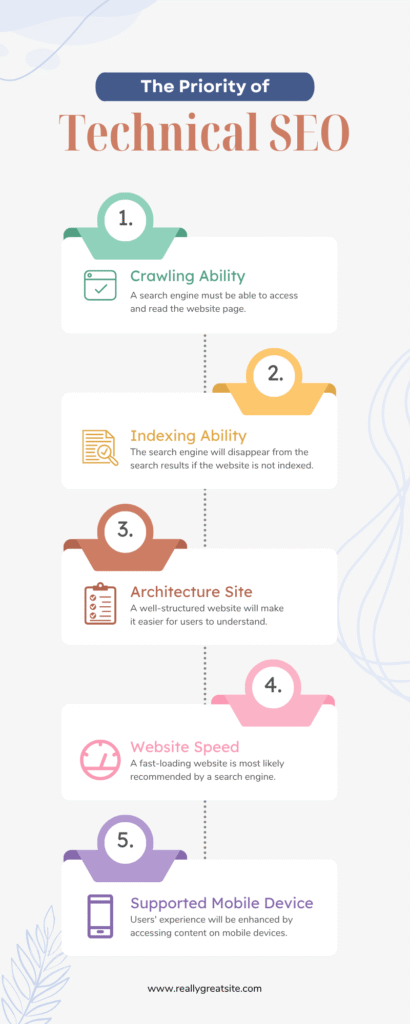
A technical SEO audit is my go-to starting point for identifying and fixing issues that could hinder a website’s search engine performance. It’s all about analyzing a site’s technical framework to ensure it’s easy for search engines to crawl, index, and rank.
The Key Elements I Evaluate:
- Website Architecture: Ensuring the structure supports easy navigation and indexing.
- Crawlability: Checking for issues that block search engines from accessing pages.
- Speed Optimization: Analyzing load times and eliminating bottlenecks.
- Mobile Usability: Ensuring mobile users have an exceptional experience.
- Security: Implementing HTTPS to build trust and improve rankings.
Stat: Over 68% of online experiences begin with a search engine, making technical SEO crucial for visibility.
Why Technical SEO Is My Priority
1. I Diagnose and Fix Technical Issues
When I take on a project, the first thing I do is dig deep to uncover hidden issues. Using tools like Google Search Console, Screaming Frog, and SEMrush, I identify:
- Crawl Errors: These prevent search engines from accessing content.
- Broken Links: I ensure all internal and external links lead to live, relevant pages.
- Slow Loading Times: Large image files and unoptimized code are common culprits I tackle.
Example: A client once had a robots.txt file blocking search engines from indexing key pages. Resolving it led to a 40% increase in organic traffic within weeks.
2. I Save Time for My Clients
Technical SEO audits can be time-intensive. For my clients, I streamline the process by quickly identifying problems and recommending actionable fixes. Instead of spending hours troubleshooting, they get a clear roadmap for improvement.

How I Perform a Technical SEO Audit
1. Analyzing Website Performance
The first step in every audit is evaluating site speed and performance.
- Tools I Use: Google PageSpeed Insights, GTmetrix, and Lighthouse.
- What I Look For:
- Large image files slowing down the site.
- Excessive server requests.
- Unoptimized CSS or JavaScript.
Stat: Websites that load within 3 seconds experience 50% lower bounce rates than slower sites.
2. Crawlability and Indexing
Search engines need to access and index your site’s content effectively.
- My Process:
- Reviewing the robots.txt file and XML sitemap.
- Identifying crawl errors in Google Search Console.
- Ensuring important pages are indexed while excluding irrelevant ones.
Example: One client’s site had duplicate pages indexed, causing cannibalization. By consolidating these with canonical tags, I improved their rankings for targeted keywords.
3. Fixing Technical Errors
I systematically resolve issues like:
Duplicate Content: Using canonical tags to prevent penalties.
Broken Links (404 Errors): Fixing or redirecting links to maintain user trust and SEO value.
Redirect Loops: Simplifying unnecessary redirections.
Improving Mobile Usability
With over 60% of searches coming from mobile devices, optimizing for mobile users is essential.
How I Approach Mobile Optimization:
- Responsive Design: Ensuring sites adapt beautifully to all screen sizes.
- Page Speed on Mobile Devices: Compressing images and prioritizing critical resources for faster loading.
- Navigation and Clickability: Testing buttons and menus to ensure they’re mobile-friendly.
Pro Tip: Mobile optimization isn’t just about functionality—it’s about creating a seamless experience that keeps users engaged.
How I Choose Tools for Technical SEO
To deliver the best results, I rely on a suite of professional tools. Here’s what’s in my toolkit:
Google Search Console: For indexing insights and performance data.
Screaming Frog SEO Spider: For crawling websites and identifying errors.
SEMrush: To analyze backlinks, keywords, and technical SEO issues.
Enhancing Security with HTTPS
Website security is a critical ranking factor. I always ensure my sites and my client’s websites are HTTPS-secured. This builds user trust and aligns with search engine preferences.
My Process:
- Setting up SSL certificates.
- Fixing mixed content warnings (HTTP links on HTTPS pages).
- Ensuring secure connections across the site.
Stat: 85% of users are unlikely to interact with a site flagged as “not secure.”
– Terry a O’Neal


How I Choose Tools for Technical SEO
To deliver the best results, I rely on a suite of professional tools. Here’s what’s in my toolkit:
Google Search Console: For indexing insights and performance data.
Screaming Frog SEO Spider: For crawling websites and identifying errors.
SEMrush: To analyze backlinks, keywords, and technical SEO issues.

Benefits of Investing in Technical SEO
1. Higher Search Engine Rankings
By fixing technical issues, I ensure search engines can crawl and index sites effectively, improving rankings over time.
2. Faster Load Times
Optimizing speed reduces bounce rates and enhances user satisfaction, directly impacting conversions.
3. Enhanced User Experience
An optimized website feels faster, safer, and easier to navigate, leading to increased engagement and retention.

Analyzing Website Performance: The Foundation of Every Audit
When working as a technical SEO audit consultant, one of the first steps I take is analyzing a website’s performance. It’s not just about speed—though that’s critical—but also about understanding how users interact with the site and identifying bottlenecks in the user experience.
My Go-To Tools for Performance Analysis
To uncover insights about site performance, I rely on a combination of tools, including:
- Google PageSpeed Insights
- This tool offers a detailed breakdown of page speed and highlights areas for improvement, such as unoptimized images or render-blocking scripts.
- GTmetrix
- It provides visualizations of page loading processes, which help pinpoint delays in rendering.
- Lighthouse Reports
- Lighthouse goes deeper into performance metrics like accessibility, SEO, and best practices.
What I Look For During an Audit
- Page Load Times
- Websites that load within three seconds have significantly lower bounce rates. During audits, I optimize for speed by compressing images, enabling browser caching, and minimizing unnecessary scripts.
- User Flow
- I simulate real-world browsing scenarios to ensure smooth navigation. Are pages easy to access? Are there unnecessary redirects? These are key questions I address.
- Mobile Responsiveness
- With over 60% of web traffic coming from mobile devices, I test site responsiveness across various screen sizes. I often find issues like buttons being too small or navigation menus being clunky on smartphones.
Real-Life Example
I recently worked on a client’s e-commerce site with sluggish load times due to oversized product images. By compressing the images and enabling lazy loading, I cut the average page load time from 5.6 seconds to 2.1 seconds. This change alone improved their bounce rate by 30%.
Enhancing Crawlability and Indexing for Optimal Results
Crawlability and indexing are the backbone of search engine visibility. As a technical SEO audit consultant, I ensure that search engines can navigate my clients’ sites effectively and index the most critical pages.
My Approach to Crawlability
- Examining Robots.txt Files
- The robots.txt file acts as a roadmap for search engines. During audits, I check for any unnecessary blocks that might prevent key pages from being crawled.
- Analyzing XML Sitemaps
- A well-structured sitemap helps search engines prioritize and understand site content. I ensure sitemaps are clean, updated, and submitted to Google Search Console.
- Fixing Crawl Errors
- Using tools like Screaming Frog and Google Search Console, I identify crawl errors like 404 pages, redirect loops, and server issues.
What I Do to Improve Indexing
- Canonicalization
- Duplicate content can confuse search engines. I use canonical tags to consolidate duplicate pages, ensuring the right one gets indexed.
- Noindex Tags
- I strategically apply no index tags to pages like admin logins or outdated content that doesn’t add value to search results.
Client Success Story
One client’s robots.txt file was inadvertently blocking their blog section from being crawled. By fixing this and updating their sitemap, I helped increase organic traffic to their blog by 40% within three months.

Long-Term Strategy for Technical SEO Success
As a technical SEO audit consultant, my ultimate goal is not just to fix immediate issues but to set up a foundation for long-term success. This requires a combination of monitoring, ongoing optimization, and adapting to evolving SEO trends.
Ongoing Monitoring and Maintenance
- Regular Audits
- I perform quarterly SEO audits to ensure everything is running smoothly. Technology changes, and so do search engine algorithms, so staying proactive is key.
- Using Alerts
- Tools like SEMrush and Ahrefs offer alerts for changes in site health, such as broken backlinks or sudden drops in rankings.
Staying Ahead of Trends
- Core Web Vitals
- With Google emphasizing metrics like Largest Contentful Paint (LCP) and Cumulative Layout Shift (CLS), I focus on optimizing these areas for my clients’ sites.
- Voice Search Optimization
- As voice search grows, I help clients adapt by structuring content for natural language queries and implementing schema markup.
Educating Clients
One thing I’ve learned as a consultant is the importance of client education. I ensure clients understand how their site works and what improvements have been made. This not only builds trust but empowers them to maintain their site’s health.
A Client-Focused Approach
A client once asked why their rankings fluctuated despite initial improvements. I explained how seasonal trends, competitor actions, and algorithm updates can impact rankings. Together, we developed a quarterly strategy to address these fluctuations, resulting in steadier performance over time.

Everything You Need to Know About Technical SEO Audits
This FAQ covers the most common questions and solutions to ensure your website performs at its best.
FAQ
Here are the top 15 frequently asked questions about technical SEO audits, along with clear and actionable answers.
1. What is a technical SEO audit?
A technical SEO audit is a comprehensive analysis of a website’s backend and structural elements to identify issues that hinder search engine crawling, indexing, and ranking. It focuses on site performance, mobile usability, security, and other technical aspects.
2. Why is a technical SEO audit important?
It ensures your website is optimized for search engines and users by fixing issues that may lower rankings, reduce traffic, or hurt user experience. An audit can improve visibility, speed, and overall functionality.
3. How often should I conduct a technical SEO audit?
A technical SEO audit should be conducted every 6 to 12 months or after significant website changes, such as a redesign, migration, or new content strategy.
4. What tools are commonly used in a technical SEO audit?
Popular tools include:
- Google Search Console (crawl and indexing errors)
- Screaming Frog SEO Spider (site crawling)
- GTmetrix and PageSpeed Insights (performance analysis)
- Ahrefs or SEMrush (backlink analysis and site health)
5. How long does a technical SEO audit take?
The duration varies depending on the site’s size and complexity. A basic audit for a small website may take a few hours, while a detailed audit for a large e-commerce site can take several days.
6. What are common issues identified in a technical SEO audit?
Some common issues include:
- Crawl errors (404 pages, redirect loops)
- Slow page load times
- Duplicate content
- Broken internal or external links
- Missing meta tags or alt text
- Mobile usability problems
7. What is crawlability, and why is it important?
Crawlability refers to how easily search engine bots can access and explore your site’s content. Poor crawlability can prevent important pages from being indexed, leading to lower rankings.
8. What is the difference between a technical SEO audit and an SEO content audit?
- Technical SEO Audit: Focuses on backend elements like site structure, speed, and indexing.
- SEO Content Audit: Analyzes on-page elements such as keywords, readability, and relevance of content.
9. How do I check if my website is mobile-friendly?
You can use tools like Google’s Mobile-Friendly Test to evaluate your site’s mobile usability. Key areas to check include responsive design, font size, button placement, and page speed on mobile devices.
10. What is canonicalization, and why is it important?
Canonicalization resolves duplicate content issues by designating a preferred URL for similar pages. It prevents search engines from splitting ranking authority between duplicate pages.
11. How does HTTPS impact SEO?
Search engines favor secure sites. Using HTTPS ensures encrypted communication, boosts trust with users, and can positively impact your search engine rankings.
12. What are Core Web Vitals, and why do they matter?
Core Web Vitals are user experience metrics that measure:
- Largest Contentful Paint (LCP): Page load speed.
- First Input Delay (FID): Interactivity.
- Cumulative Layout Shift (CLS): Visual stability.
Improving these metrics is essential for better search rankings and user satisfaction.
13. How do I fix duplicate content on my site?
- Use canonical tags to indicate the preferred version of a page.
- Consolidate similar pages into one.
- Add no index tags to duplicate or irrelevant pages.
14. What role does XML sitemap play in SEO?
An XML sitemap helps search engines discover and prioritize important pages on your site. It ensures all key pages are crawled and indexed efficiently.
15. Can I perform a technical SEO audit on my own?
Yes, you can use tools like Google Search Console, Screaming Frog, and GTmetrix to perform a basic audit. However, for comprehensive analysis and fixes, hiring a professional technical SEO a

Conclusion
Mastering technical SEO isn’t about chasing trends—it’s about building a strong foundation for sustainable, long-term growth. As a technical SEO audit consultant, my role is to diagnose the hidden flaws, apply actionable fixes, and create a faster, more secure, and user-friendly experience. From enhancing mobile usability to resolving crawl issues, every step matters.
And if you’re serious about growth—whether you’re an entrepreneur, eCommerce owner, or freelancer—you can’t afford to ignore your site’s health.
Here are some trusted resources I recommend:
- 🔗 Google PageSpeed Insights – Analyze load speed and performance bottlenecks.
- 🔗 Screaming Frog SEO Spider – Crawl your website like a search engine.
- 🔗 SEMrush Site Audit Tool – Full technical SEO and backlink analysis.
- 🔗 Google Search Console – Essential tool to monitor crawlability and indexing.
More Articles
-

How Accepted Insurance Plans Can Strengthen Medical Local SEO
When patients search for a doctor, they are not only looking for the right specialty or the closest medical office. Many also need to know whether the practice accepts their insurance. A patient might search Google for: If your website does not clearly list the insurance plans your practice accepts, Google and potential patients may…
-
Brooklyn Nursing Home Marketing in 2026: How to Turn Google Searches Into More Admissions
If you’re responsible for marketing or admissions at a nursing home, you already know how to generate business the traditional way. You know the importance of hospital relationships. You know your discharge planners, case managers, physicians, community partners, and referral sources. You know what happens to census when those relationships are strong, and you know…
-

Google Reviews and Search Console: Drive More Traffic to Your Queens Medical Practice
Google Reviews and Search Console: Drive More Traffic to Your Queens Medical Practice A patient in Queens searches Google for a family doctor, chiropractor, dentist, physical therapist, podiatrist, urgent care center, or medical specialist. Within seconds, that patient may see several practices competing for attention. The listings can look similar, but the patient still has…