

When people think about building a website, they picture logging into some fancy platform, dragging boxes around, hitting publish… and praying it looks right.
But here’s the twist:
Some of the best website work happens outside that “one platform” mindset.
You have two strong options:
- Offline website builders (you build on your computer, then upload)
- Tools like SubPage (you add high-quality pages fast, without rebuilding your whole site)
Let’s keep this real, simple, and useful.
First: What Is SubPage?
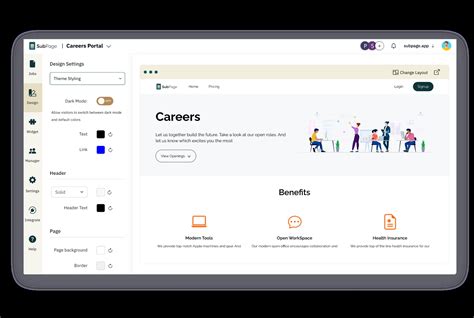
SubPage is a no-code tool that helps you add “extra pages” to your website—like:
- Blogs
- Help centers
- Careers pages
- Roadmaps
- Policy pages
And it’s built to work with your current website, not replace it. SubPage says it integrates using domain/DNS, so it doesn’t matter if your main site is on Webflow, Wix, WordPress, Squarespace, or something else. (subpage.app)
Think of it like this:
Your website is the house.
SubPage helps you quickly add new rooms—without tearing the house down.
So… Why Do People Like Offline Website Builders?
Offline website builders are different.
You build the site on your laptop (even with no internet), and later you upload the files to your host.
People like offline builders because:
- They can work without Wi-Fi
- They keep files on their own computer
- They can upload the site anywhere
- They often give more control over code
If you want a classic offline builder example, tools like Mobirise are known for building offline and then publishing anywhere. (mobirise.net)

SubPage vs Offline Builders: What’s the Real Difference?
Here’s the simple breakdown:
| Feature | SubPage | Offline Website Builder |
|---|---|---|
| Best for | Adding blog/help/careers pages fast | Building full sites offline |
| Needs internet while building | Usually yes | No |
| Works with your existing site | Yes (subpage.app) | Sometimes (depends on setup) |
| Code ownership | Depends on the tool | Often full control |
| Speed to launch new pages | Very fast (subpage.app) | Slower (build + upload) |
Why Beginners Should Care (No Fluff)
If you’re new, you want three things:
1) Simple setup
SubPage is built for non-tech folks and includes page features like forms, search, and tracking on certain page types. (subpage.app)
2) Fast results
If you need a blog, help center, or careers page this week, SubPage is made for that.
3) Better website performance goals
Google cares about “page experience,” which includes things like speed, mobile-friendly design, and HTTPS. (Google for Developers)
So whether you use SubPage or an offline builder, your pages still need to load fast and work well.
Quick Start: How to Get Going With SubPage
Here’s the beginner path:
- Sign up for SubPage
- Pick the page type you need (blog, careers, help center, etc.) (subpage.app)
- Add your content and match your brand style
- Connect your domain (DNS setup) so it works with your main website (subpage.app)
- Publish your new pages
That’s it. No giant rebuild.
(Official site: https://subpage.app/) (subpage.app)
Beginner Mistakes to Avoid (Keep These in Your Back Pocket)
1) Forgetting mobile
Mobile traffic is huge, and many web stats show mobile is the majority. (Forbes)
Always check how pages look on a phone.
2) Stuffing pages with too much
More blocks doesn’t mean better. Keep pages clean:
- One main message
- One main action (call, book, buy)
3) Using giant images
Big images = slow pages. Slow pages lose visitors.
4) Skipping security basics
Cyberattacks hit small businesses a lot. Reports like Verizon’s DBIR are often cited for showing how common breaches and ransomware are, especially for smaller orgs. (Verizon)
Use HTTPS and strong logins.
5) Not planning navigation
Don’t wait until the end to figure out your menu. Do it early.
Who Should Use SubPage?
SubPage makes the most sense if you:
- Already have a website (Wix, Webflow, WordPress, etc.)
- Need extra pages fast (blog, help, careers, policies)
- Don’t want to hire a developer for every new page (subpage.app)
FAQs
1) Is SubPage an offline website builder?
No—SubPage is a no-code tool for publishing subpages that connect to your existing site using domain/DNS. (subpage.app)
2) What pages can I make with SubPage?
Common ones include blogs, help centers, career pages, roadmaps, policy pages, and more. (subpage.app)
3) Do offline website builders still matter?
Yes. They’re great if you want to build a full site locally and upload it anywhere—especially if you need offline work. (mobirise.net)
4) Will SubPage work with my current website builder?
SubPage says it works with many site builders because it connects through domain/DNS, so your main platform matters less. (subpage.app)
5) Do these pages help SEO?
They can. Helpful content + good page experience can support visibility. Google explains page experience as part of what it looks at (speed, mobile-friendly, HTTPS, etc.). (Google for Developers)
6) What’s the biggest beginner win here?
Speed + clarity. You stop overbuilding and start publishing pages people actually need.
Final Word: Build Smart, Not Just Fast
If you want full control and offline work, an offline builder can be a great fit.
If you already have a website and you just need strong pages—blog, help, careers, policies—SubPage can be a clean shortcut that saves time and stress. (subpage.app)
Either way, the goal is the same:
Make it easy for people to trust you, learn from you, and take action.
Related Articles
Latest Articles
- Google Review Removal Service That Protects Your Reputation and Builds Trust
- Google Review Management Agency That Helps Businesses Build Trust and Get More Customers
- How to Get New Patients in New York With Google Reviews
- How Accepted Insurance Plans Can Strengthen Medical Local SEO
- Brooklyn Nursing Home Marketing in 2026: How to Turn Google Searches Into More Admissions








