


Why External Links Matter for Your SEO Strategy
External links aren’t just about sending people away from your site—they’re about showing Google and your readers that you’re connected to trusted information sources.
Google considers relevant, quality outbound links as a trust signal (Search Engine Journal). And for readers, it’s like saying, “Here’s proof I’m not making this up—check the source.”
Choosing the Right Authority Sites to Link To
Relevance to Your Niche
If you run a faceless marketing blog, linking to a high-quality SEO case study makes sense. Linking to random celebrity gossip? Not so much.
Domain Authority and Reputation
Aim for reputable sources—think Forbes, Harvard Business Review, Moz, Ahrefs, Google Search Central.
Up-to-Date and Accurate Content
Outdated data can make your own content look stale.
Best Practices for Adding External Links
Link to Reputable, Niche-Relevant Sources
Example: Writing about page speed? Link to Google PageSpeed Insights.
Set Links to Open in a New Tab
Keeps visitors on your site while still giving them extra information.
Use Descriptive Anchor Text
✅ “According to a [case study by Ahrefs]…”
❌ “Click here for more info”

Examples of Effective External Linking
Case Study Links
Point to real-world success stories or experiments that validate your point.
Linking to Research and Statistics
Example: “According to Think with Google, a 1-second delay can drop conversions by 20%.”
Citing News and Industry Updates
If there’s a major update from Google, link to their official blog post.
How External Links Improve SEO and Authority
Earning Trust Signals from Search Engines
When you link to well-established domains, it signals that your content is part of a credible information ecosystem.
Providing More Value to Readers
You become a go-to resource when your content is backed by evidence and expert sources.
External Linking for Faceless Marketing Sites
Without a personal brand face, you can borrow credibility from trusted industry leaders by linking to them.
Example:
If your post is about SEO tools for beginners, linking to Moz’s Beginner’s Guide to SEO reinforces your authority.
🚫 Common External Linking Mistakes to Avoid
You and I both want our content to build trust and rank well in search engines, right? But here’s the truth—if we’re not careful, external linking mistakes can do the exact opposite. Instead of boosting our credibility, they can weaken our SEO strategy and push readers away. Let’s break down the most common slip-ups you and I need to avoid.
1️⃣ Linking to Low-Quality or Irrelevant Sites
One of the biggest external linking mistakes is sending readers to sites that don’t have authority or relevance. Imagine you’re writing about SEO, but you link to a random forum post with bad advice. Not only does that hurt trust, but Google may also question your content’s quality. Always choose authority links—sites like Google Search Central or Moz—so both readers and search engines see your work as reliable.
2️⃣ Using “Click Here” Instead of Descriptive Anchors
You and I have both seen this before: “Click here to learn more.” The problem? That anchor text tells Google nothing about the link’s content. By missing the chance to use descriptive anchor text, we waste an SEO opportunity. Instead of “click here,” we should write something like “learn more in Google’s SEO Starter Guide.” It’s better for readers and a stronger SEO signal.

3️⃣ Overloading with Too Many External Links
Here’s another trap: stuffing an article with outbound links everywhere. I get it—we want to share resources. But too many links can overwhelm readers and distract them from your main message. Think of it like seasoning food—too little and it’s bland, too much and it’s unbalanced. The sweet spot is 2–5 high-quality, relevant external links per post.
👉 The bottom line? You and I should treat external linking like a strategy, not an afterthought. By avoiding these external linking mistakes—low-quality sites, weak anchor text, and link overload—we keep our content trustworthy, user-friendly, and SEO-ready.
– Molière
Tools for Finding Authority Sources to Link To
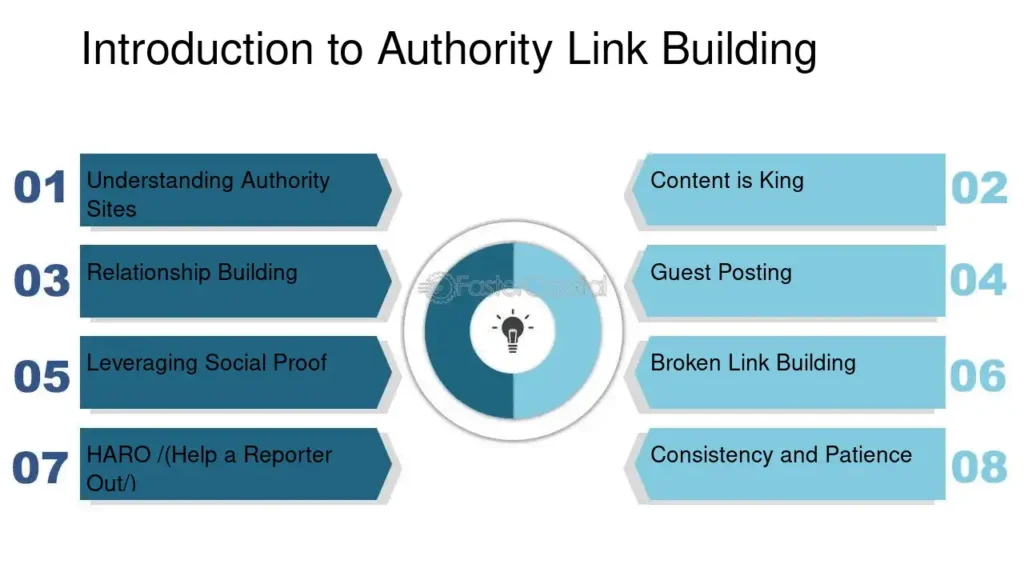
Ahrefs Content Explorer – Find top-performing articles in your niche.
Google Scholar – Access peer-reviewed research.
BuzzSumo – Discover trending content and influencers.
FAQs About External Linking to Authority Sites
Q1: Do external links help my SEO?
A: Yes—when used correctly, they can improve credibility and relevance.
Q2: Should I nofollow external links?
A: Only if you don’t want to pass link equity (e.g., for sponsored content).
Q3: How many external links should I use in a post?
A: 2–5 is a safe range for most blog posts.
Q4: Can I link to competitors?
A: Yes—if they have valuable resources your readers will benefit from.
Q5: Should I check my external links regularly?
A: Yes—broken links can harm SEO and user experience.
Q6: Should all external links open in new tabs?
A: For user convenience, yes.
✅ Quick External Linking Checklist for You and Me
When you and I add outbound links, we want them to help our SEO strategy, not hurt it. Here’s a simple 5-step checklist you and I can follow every time:
1️⃣ Check the Source Quality
Ask yourself: “Would I trust this site?” If the answer is no, don’t link to it. Stick with authority links like Google Search Central or Moz.
2️⃣ Use Descriptive Anchor Text
Instead of “click here,” use natural keywords. Example: “See this SEO guide from Google.” That way, Google understands the link’s topic.

3️⃣ Keep It Relevant
Every link should connect directly to your content. If you and I are talking about SEO, we shouldn’t drop in a random link about fashion trends.
4️⃣ Don’t Overload Your Content
Too many external links can distract readers. Stick to 2–5 solid outbound links in most posts.
5️⃣ Open Links in a New Tab
This way, readers don’t lose your page. You and I keep them engaged while giving them extra resources.
👉 If you and I follow this external linking checklist, we’ll avoid the most common external linking mistakes, keep readers happy, and give Google a clear signal that our content is trustworthy.
🌟 Conclusion: Let’s Make External Links Work for You and Me
You and I both know that writing great content is only half the battle. To really stand out, we need to show Google—and our readers—that we’re connected to trusted sources. That’s where external links come in.
When you and I link to reputable, niche-relevant sites, we’re not just giving credit where it’s due—we’re also boosting our own credibility. Think about it: if you’re reading an article and it points you to Google’s SEO Starter Guide (Google Search Central), doesn’t that make the article feel more trustworthy?
And it’s not just about trust. Linking out can actually help with rankings too. For example, Moz explains that linking to authority sources helps search engines better understand your content’s relevance (Moz SEO Basics).
So here’s our simple plan:
✅ Use descriptive anchor text (no more “click here”)
✅ Link to trusted sources in your niche
✅ Open those links in a new tab, so readers don’t lose your page
By doing this, you and I keep readers engaged, build authority, and give Google all the right signals. It’s such a small step, but it has a big payoff.
👉 Next time we write an article, let’s make a promise: add at least 2–3 solid external links. Trust me, our readers—and our SEO—will thank us for it.

Related Articles
Faceless Marketing for eCommerce: How to Increase Conversions
Optimized Title Tags for Faceless Marketing: 7 Secrets to Success
Meta Descriptions That Sell: How to Get Clicks Without Clickbait
Header Tag Structure (H1–H6): The SEO-Friendly Guide for Better Rankings
Internal Linking Strategy: How to Boost SEO and Keep Readers Engaged








