


Low-difficulty keywords are the easiest way to start ranking in Google—fast. When I was new to SEO, all the competition felt impossible. But then I found Ahrefs Keyword Explorer. It’s one of the best tools to find keywords that aren’t too hard to rank for. In this beginner’s guide, I’ll show you how I use it to filter and find easy-win keywords with real traffic.

What Is Ahrefs Keyword Explorer?
Ahrefs Keyword Explorer is a research tool that provides detailed keyword data, including search volume, keyword difficulty, CPC, click data, and SERP features. It helps you find the best keywords to target based on real data.
Why It’s a Must-Have for SEO Beginners
It’s intuitive, visually rich, and gives you data you can trust—even if you’re just starting out in SEO.

How Ahrefs Calculates Keyword Difficulty (KD)
What KD Means
KD (Keyword Difficulty) measures how hard it is to rank in Google’s top 10 results, based primarily on backlink data.
How It’s Scored
It’s a 0–100 scale. A lower score means fewer backlinks are needed to compete.
Why Low KD Keywords Matter
Low KD = less competition, quicker wins, and ideal for new or small websites.

Benefits of Targeting Low-Difficulty Keywords
- Rank Faster – Without heavy link building
- Cost-Effective – No need for paid traffic
- Build Authority – Get traffic and grow your brand organically
Setting Up Keyword Explorer for Best Results
Enter your seed keyword (e.g., “vegan snacks”, “digital planner”)
Go to Keyword Explorer in Ahrefs
Choose your target country (e.g., United States)

Step-by-Step: How to Filter for Low-Difficulty Terms
Step 1: Set Keyword Difficulty to Under 30
Use the KD filter and set a max of 30 for easy-to-rank keywords.
Step 2: Add a Minimum Volume Filter
Start with 100–500 searches/month minimum to find terms with traffic potential.
Step 3: Use Word Count Filters
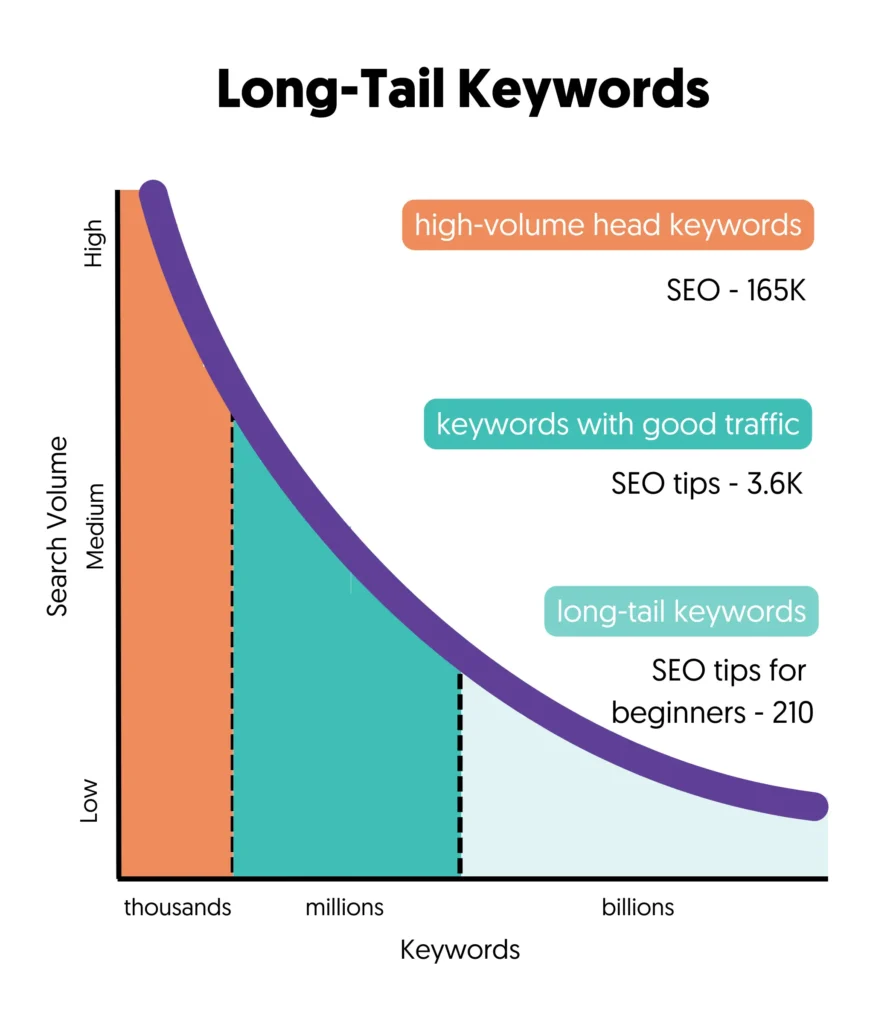
Set a word count minimum of 3 to focus on long-tail keywords, which are typically less competitive.
Using the “Questions” Filter to Find Long-Tail Keywords
Questions are gold for blog posts and tutorials. Click the “Questions” tab to find terms like:
“best email tool for beginners”
“what is a digital planner”
“how to start a vegan diet”

Leveraging the “Include” and “Exclude” Filters
Use the Include filter to narrow results to specific themes (e.g., “tips,” “ideas,” “for beginners”).
Use the Exclude filter to remove branded or unrelated keywords that clutter your list.
How to Analyze Keyword Opportunities
SERP Features – Are there featured snippets or videos?
Volume – Enough people searching?
KD – Can you realistically compete?
CPC & Clicks – Does it have commercial intent or traffic value?
Matching Keywords to Content Types
Navigational: Avoid unless you own the brand
Informational: “how to…” → Write blog posts or guides
Transactional: “best [product] for [need]” → Build product or review pages


How to Analyze Keyword Opportunities
- Volume – Enough people searching?
- KD – Can you realistically compete?
- CPC & Clicks – Does it have commercial intent or traffic value?
- SERP Features – Are there featured snippets or videos?

How to Save and Export Keyword Lists in Ahrefs
Export as CSV to plan content
Use checkboxes to select terms
Click Add to list
Organize by topic (e.g., “Blog Ideas,” “Ecommerce Keywords”)
Examples of Low KD Keyword Wins
A niche site targeted “best planners for ADHD students” (KD 10, 2,200 volume).
Now brings in 250 visits/month
Created a simple 1,500-word article
No backlinks
Ranked top 5 in 3 weeks

Mistakes to Avoid When Filtering Keywords
Assuming Low KD Means Low Effort – Still needs great content!
Ignoring Search Intent – Don’t create a product page for a question keyword
Chasing Irrelevant Volume – Focus on relevance over vanity metrics
Eleanor Harris (American, 1901-1942)

Best Practices for Beginner SEO Success
Update and re-optimize old posts
Research consistently
Build content around low-KD terms
Track rankings monthly
FAQs About Using Ahrefs Keyword Explorer
1.Is Ahrefs Keyword Explorer beginner-friendly?
Yes! It has clear filters and helpful data visualization, making it easy to use even if you’re just starting out. Plus, Ahrefs offers a step-by-step beginner’s tutorial that walks you through everything from keyword ideas to filtering by difficulty.
2. What’s a good KD score to aim for?
Start with KD under 30—ideal for newer sites.
3. How often should I do keyword research?
At least monthly, or whenever you’re planning new content.
4. Can I use Ahrefs for free?
No, it’s a paid tool—but worth it for serious SEO work.
5.How many keywords should I target per post?
Focus on one primary keyword—your main target. Then include 2–3 supporting long-tail keywords that relate closely to your topic. This helps you rank for multiple search terms and build topical relevance. For a deeper breakdown, check out Yoast’s guide on keyword strategy.
Conclusion: Start Smart with Low-Difficulty Keywords in Ahrefs
The Ahrefs Keyword Explorer is your best friend when it comes to finding easy-to-rank terms. With a few smart filters, even beginners can uncover powerful low-difficulty keywords that drive traffic without needing tons of backlinks. So get in, filter smart, and start creating content that climbs the rankings.
Related Articles
How to Target High-Volume Keywords with Low Ahrefs KD (< 30): Tactical SEO Guide
How To Use Ahrefs Content Gap Tool to Discover Keyword Opportunities That Rank
Long-Tail Keywords for Beginners: Easy SEO Wins with Ahrefs
What is KD in Ahrefs? Keyword Difficulty for Smarter SEO And Better Ranking








